
Descript vs Otter vs Castmagic: Ultimate Comparison for Podcasters (2026)
When editing is done and transcription complete, the real work of content creation still looms ahead. See why podcasters are switching to Castmagic for the only solution that transforms recordings into ready-to-publish assets across every platform that matters.
Try Castmagic
Feature |

Descript |

Otter AI |
.png)
Castmagic |
|---|---|---|---|
| Content Import & Management | ✅ Supports file uploads or imports from YouTube, GIPHY, or Zoom | ✅ Leverages calendar integration: OtterPilot auto-joins Zoom/Teams meetings to record and transcribe them in real-time | ✅ Supports file uploads and imports from YouTube, TikTok, Instagram, Vimeo, GDrive, Twitch, Reddit, Wistia, Rumble, Loom, or Zoom |
| AI-Powered Transcription | ✅ Transcribes in 25 languages; with automatic speaker identification | ⚠️ Currently only supports English, Spanish, and French | ✅ Offers instant, highly accurate transcription in 60+ languages; with automatic speaker identification |
| AI Content Generation | ⚠️ Generates summaries and limited types of content | ⚠️ Creates concise meeting summaries and action item lists; useful for meetings but not so much for content creation | ✅ Generates 100+ content assets (social posts, blogs, emails, etc.) from 1 recording |
| Contextual AI Assistant | ❌ No built-in AI chatbot for interactive Q&A on your content | ✅ Allows real-time Q&A with an AI chatbot during and after meetings | ✅ Comes with Magic Chat, an AI chatbot that understands the context of your recording and produces on-point answers or write-ups |
| Audiograms & Video Clips | ✅ Full timeline video editor to craft clips with captions, waveforms, images, etc. | ❌ Not applicable—Otter is not a tool for creating audiograms or video clips; its output is text-based | ✅ Enables quick creation of shareable clips and audiograms: highlight your favorite moments and export them as audio or video files ready to post |
| Customization & Branding | ✅ Offers templates and branding tools for video/audio outputs | ❌ Outputs—transcripts, summaries, action lists—are fairly generic in style | ✅ Allows you to be in control of how the AI writes; you can add Custom Prompts to shape the content’s tone, style, or format to match your brand voice |
| Real-Time Collaboration | ✅ Multiple users can work on a Descript project and teammates can add comments on the transcript/timeline | ⚠️ Highly collaborative for note-taking but not for creating content | ✅ Supports shared workspaces and multi-user access with roles; team members can concurrently review and edit content within the platform |
| Feedback & Approval Workflows | ✅ Facilitates feedback with comments and version history | ⚠️ Basic feedback via shared notes; no structured approval workflow | ✅ Team members or clients can edit content blocks directly, mention another team member, or leave feedback via comments |
| Content Project Management | ❌ Focused on production—no content calendar or other scheduling tools | ❌ Project management is specific to meeting cadences, not content projects | ✅ Enables you to manage content campaigns from ideation to publishing: create content blocks, set deadlines, assign them to specific team members, and tag them with customized labels |
| Customer Support & Community | ⚠️Offers documentation, tutorials, and a user community forum; support is available via live chat or tickets | ⚠️ Has a help center and an AI chatbot for support; no live chat support with human agents for urgent concerns | ✅ Offers live chat and quick assistance, provides a helpful onboarding call, has a Slack community of creators, and the team is very receptive to feedback |
| SCORE | 7/10 — 2nd | 4.5/10 — 3rd | 10/10 — 1st |
| Legend: ✅ Yes (fully supported); ⚠️ Limited/Basic; ❌ No support for this feature | |||
For professional podcasters, the equation is simple: time invested versus content produced. Traditional workflows mean hours spent manually transforming each episode into additional formats, severely limiting your content's reach and return on investment. Three platforms—Descript, Otter AI, and Castmagic—promise to change this equation.
The differences between these tools are significant and directly impact your content strategy's efficiency. Descript reimagined how we edit audio, Otter AI streamlined how we capture spoken words, but only Castmagic has fundamentally transformed how we repurpose content across multiple channels.
This comparison cuts through marketing promises to examine how each platform performs on metrics that matter: time saved, content variety generated, customization options, and overall workflow integration. By understanding the strengths and limitations of each approach, you'll identify which tool truly maximizes the ROI of every minute you spend behind the microphone.
Key Takeaways: Descript vs Otter AI vs Castmagic
- Descript is ideal for individual podcasters and content creators who primarily need an intuitive way to edit their audio/video by manipulating text transcripts, but don't require extensive content repurposing capabilities.
- Otter is best for teams and professionals who need accurate, quick transcription in English, French, or Spanish and basic meeting assistance features, but don't need to transform their recordings into multiple content formats.
- Castmagic is the optimal choice for professional podcasters, marketers, and content teams looking to automate their workflows and multiply their content output by transforming audio/video into polished blogs, social media posts, newsletters, and more across 60+ languages.
- Castmagic provides an end-to-end solution that goes beyond editing (Descript) and transcription (Otter) to offer AI-powered content generation, customization to match your brand voice, comprehensive workflow management, and superior language support—all in one platform.
Descript: Best for Text-Based Podcast Editing
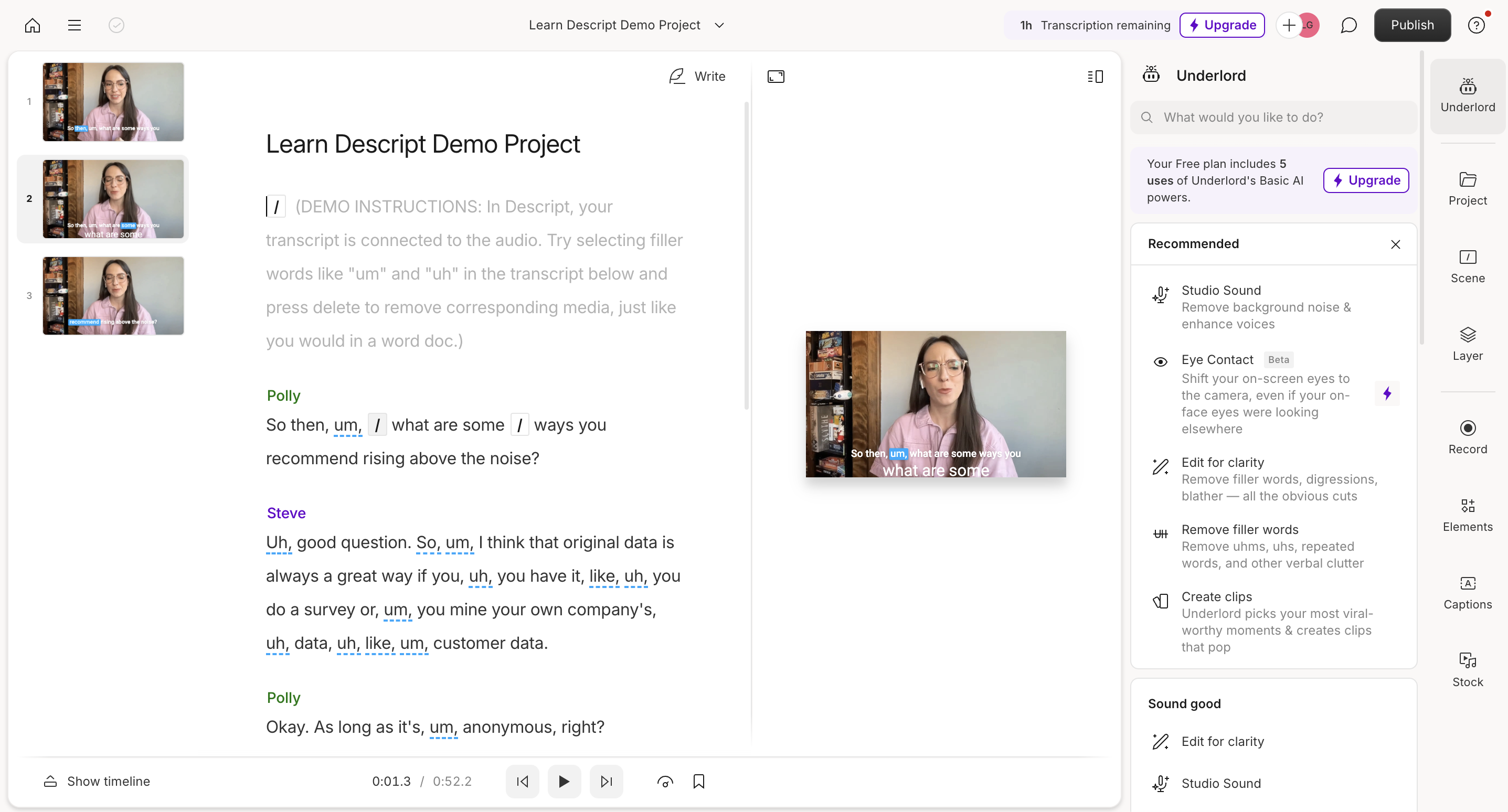
Descript offers an integrated platform where podcasters can transcribe, edit, and collaborate on media projects by simply modifying text. This approach democratizes audio editing, making it accessible even to those without traditional editing skills—just delete or rearrange words in the transcript, and the audio follows.
The platform includes convenient features like screen recording, remote recording, and AI speech synthesis. However, Descript's utility largely ends after you've polished your recording, leaving creators to manually craft additional content assets from their episodes.
While Descript excels at making podcast production more accessible through text-based editing, it lacks the advanced AI-powered content generation capabilities needed to efficiently repurpose that content across multiple formats and channels—a crucial limitation for creators looking to maximize their reach.
Otter AI: Best for Efficient Transcription
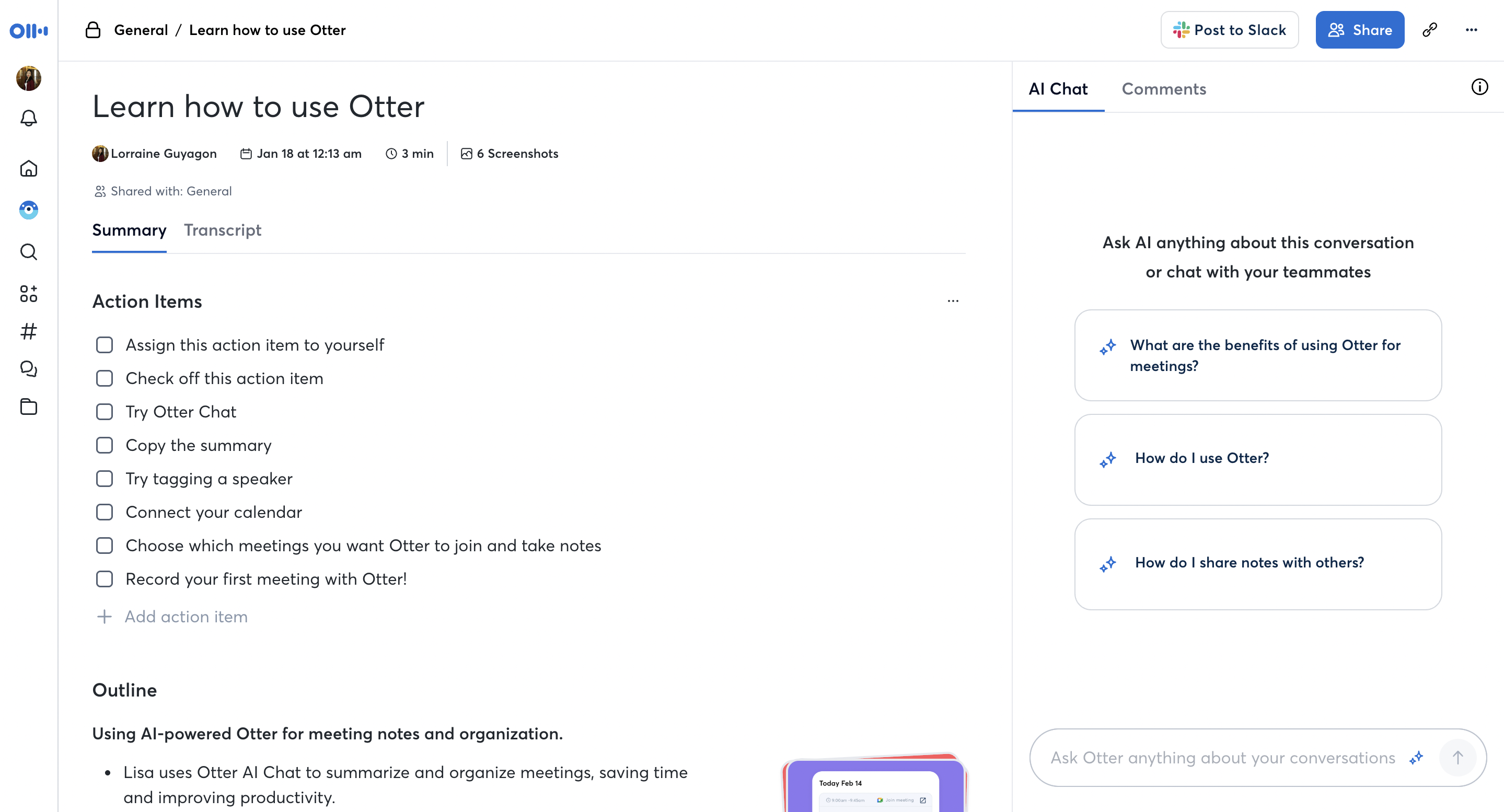
Otter AI has built its reputation on delivering fast, accurate transcriptions of spoken content. The platform streamlines this process with speaker identification, automatic summaries, and the ability to highlight key points from conversations, making it valuable for capturing meetings, interviews, and podcast recordings.
Where Otter falls short is in what happens after transcription. With support for only English, French, and Spanish, and limited tools for transforming that text into other content formats, creators are left to manually repurpose their transcripts—a time-consuming process that creates bottlenecks for busy content teams.
For podcasters, Otter essentially provides the raw material (the transcript) but offers little assistance in turning that material into the polished, platform-specific content needed for a comprehensive distribution strategy that extends beyond the audio episode itself.
Castmagic: Best for Automated Podcast Repurposing
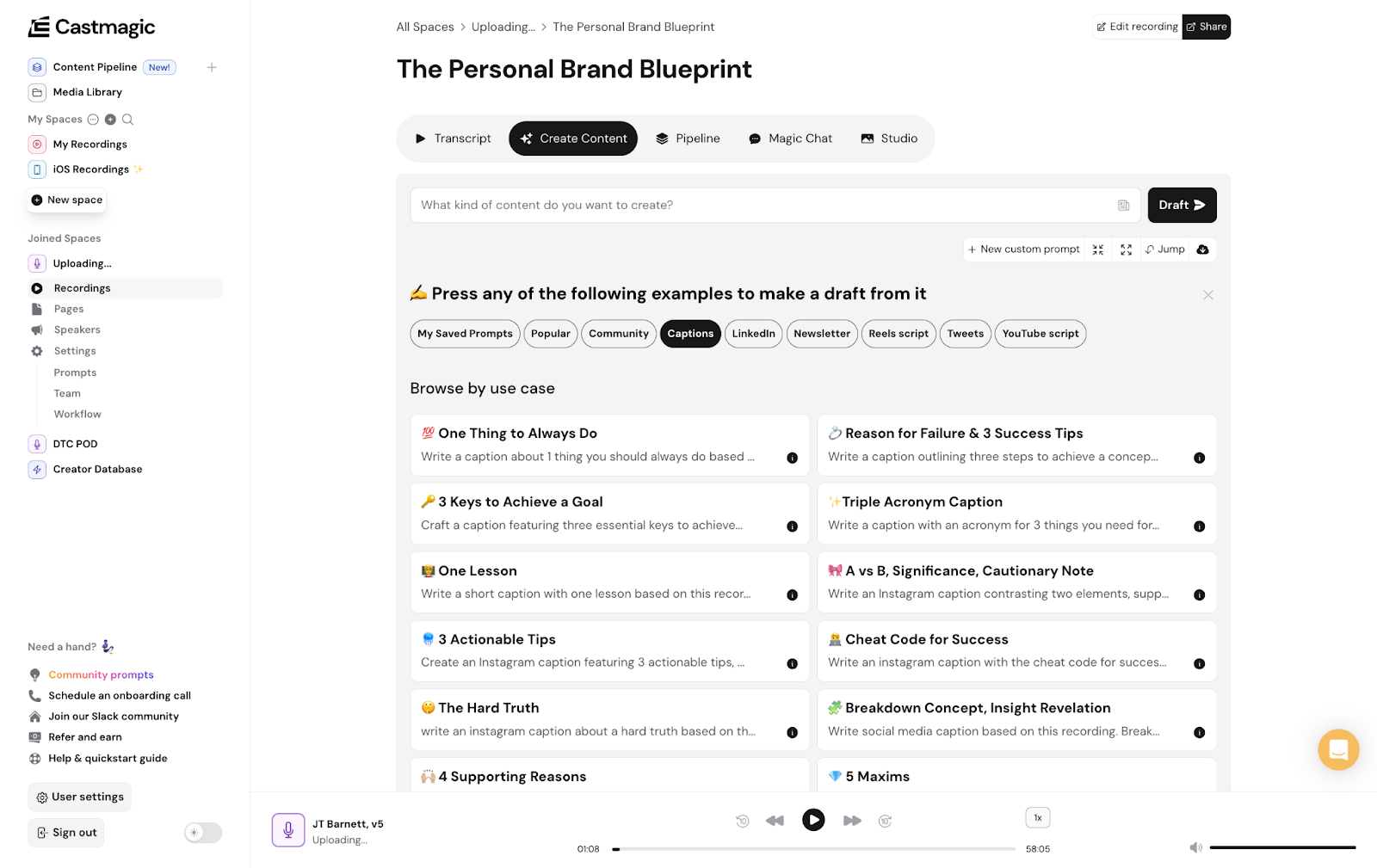
Castmagic represents the future of content workflows, turning your podcast recordings into multiple publish-ready assets in seconds. The platform not only provides highly accurate transcription in over 60 languages but also instantly generates contextual content like blogs, emails, and social posts that maintain your unique voice and style.
What truly sets Castmagic apart is its customization capabilities—you can leverage presets, community prompts, or configure your own content settings to match specific requirements for tone, voice, and format. This ensures all AI-generated content feels authentically aligned with your brand.
Trusted by over 75,000 creators and businesses, Castmagic has transformed how professionals approach content creation, allowing podcasters to focus more on producing great conversations and less on the labor-intensive process of manually repurposing that content for different platforms and formats.
Descript vs Otter: Editing vs Transcription Focus
Descript and Otter AI serve different primary functions in the content creation ecosystem. Descript focuses on editing audio and video through text manipulation, while Otter AI specializes in quick, accurate transcription with some meeting assistance features.
Both platforms offer speaker labeling and collaborative features, but neither provides robust content repurposing capabilities. Descript gives you more control over editing your original media, while Otter AI delivers better raw transcription but leaves you to figure out what to do with it afterward.
TL;DR: Descript is better for editing podcasts by manipulating text, while Otter is superior for quick transcription. Both lack Castmagic's ability to automatically generate multiple content formats from your recordings.
Descript vs Castmagic: Beyond Recording to Content Creation
While Descript and Castmagic both handle audio and video content, their approaches and capabilities differ significantly. Descript is primarily an editing tool with some AI features for enhancing audio, whereas Castmagic is a comprehensive content transformation platform.
Castmagic outshines Descript with its unrivaled AI content generation, producing high-quality blogs, social posts, and emails that require minimal editing. It also offers vastly superior customization options, allowing you to fine-tune content to match your brand voice through custom prompts and training the AI on your existing content.
For collaborative teams, Castmagic provides more robust content workspaces with granular access controls and dynamic shared content blocks. Its content workflow management capabilities make it a true command center for the entire content lifecycle, while Descript addresses only the editing segment.
TL;DR: Descript helps you edit recordings by manipulating text. Castmagic transforms those recordings into multiple publish-ready content formats while managing your entire content workflow.
Otter vs Castmagic: Transcription vs Complete Content Transformation
Otter AI and Castmagic represent two different generations of content tools. Otter focuses almost exclusively on transcription with some basic summarization features, while Castmagic uses transcription as just the first step in a comprehensive content transformation process.
The language support difference is stark—Castmagic handles over 60 languages compared to Otter's three. This makes Castmagic significantly more valuable for global teams and multilingual content creation. Additionally, Castmagic's ability to generate and customize content based on transcripts puts it in an entirely different category of utility.
Castmagic's collaborative content review tools also far surpass Otter's capabilities, with tagging systems to categorize content, track progress, and streamline feedback from team members or clients. While Otter AI stops at transcription, Castmagic starts there and opens up a world of content possibilities.
TL;DR: Otter AI gives you a transcript. Castmagic gives you that transcript plus blogs, social posts, newsletters, and other content assets—all generated automatically in your brand voice.
Work less, publish more
- Kickstart your content creation with 100+ ready-made, top-performing prompts
- Effortlessly repurpose podcasts, webinars, meetings into multi-format content
- Train AI on your top content to generate hyper-personalized variations at scale
- Scale up your content quality and quantity, not your effort
If You Use Descript or Otter, Here's Why You'll Love Castmagic
Even the most dedicated Descript and Otter users eventually hit a ceiling—that moment when editing is done or the transcript is complete, but the real work of content transformation still looms ahead. Castmagic was built specifically to eliminate these bottlenecks, providing seamless solutions to challenges you may have accepted as inevitable:
1. From One Recording to Multiple Content Formats
Castmagic transforms a single podcast episode into a treasure trove of content. While Descript helps you edit your episode and Otter gives you a transcript, Castmagic automatically generates blog posts, social media captions, email newsletters, and more—all tailored to each platform. This means every hour you spend recording can yield weeks' worth of content across multiple channels, all without the tedious manual work of reformatting and rewriting.
2. Customization That Captures Your Unique Voice
Unlike the generic output from other platforms, Castmagic allows you to fine-tune content generation to match your specific voice and style. Choose from 100+ expert-designed prompts or create your own by feeding Castmagic samples of content you want it to emulate. You can also adjust settings for tone, format, and other characteristics, ensuring all generated content maintains your brand identity across every piece—something neither Descript nor Otter can match.
3. Deep Contextual Understanding Through AI
Castmagic's Magic Chat feature demonstrates a level of contextual understanding that surpasses both Descript and Otter. Instead of simply transcribing what was said, Castmagic comprehends the meaning behind the words. Ask specific questions about your recording, request clarification on particular sections, or generate topic-specific content from it—Magic Chat delivers relevant, accurate responses that reflect a deep understanding of your content, enabling more nuanced repurposing.
4. Robust Collaboration for Content Teams
Content creation rarely happens in isolation, and Castmagic excels at supporting collaborative workflows. Every piece of content generated can be easily shared for team input. Create comprehensive long-form content from multiple media files, generate public links for distribution, or share specific content blocks for targeted review. With Castmagic's Content Pipeline, you can assign, tag, and track content through your entire workflow—far beyond the basic collaboration features offered by Descript or Otter.
5. Multimedia Asset Generation for Visual Impact
Unlike Descript's editing focus or Otter's text-only approach, Castmagic helps you create engaging multimedia assets from your audio. Simply highlight transcript sections to clip the corresponding audio/video segments, add captions to video clips, and generate eye-catching audiograms perfect for social sharing. This integrated approach to multimedia repurposing means you can create visually compelling content directly from your podcast episodes without switching between multiple specialized tools.
Why Castmagic Is the Ultimate Creator Investment
The harsh reality of podcasting in 2025 is that simply producing great audio isn't enough. Content economics demands that every recording generate multiple assets across various platforms to justify the investment of your time and resources. Descript and Otter each solve one piece of this puzzle, but Castmagic finally provides the complete solution.
What sets Castmagic apart is its fundamental rethinking of the content ROI equation. Instead of spending 2 hours recording and 10 hours repurposing, Castmagic allows you to invest those same 2 hours of recording time but eliminate virtually all manual repurposing. The result? Five times the content output with a fraction of the effort—transforming your podcast from a labor-intensive passion project into a scalable content machine.
For creators who understand that time is their most valuable asset, the choice becomes clear. Castmagic isn't just another tool in your tech stack—it's the cornerstone of a sustainable content strategy that maximizes the return on every word you speak into the microphone.
Descript FAQs
What is Descript used for?
Descript is primarily used for audio and video editing. It enables users to edit media files through easily manipulable text transcripts. This means users can cut, rearrange, and enhance content without requiring traditional editing skills.
Is Descript free or paid?
Descript offers both free and paid plans. Their free plan includes essential features like editing, exporting, and sharing videos in 720p resolution, along with one watermark-free video export per month. Users on the free plan also have access to five lifetime uses of AI features, such as Studio Sound, green screen, and filler word removal, as well as the ability to create clips and draft YouTube descriptions. The regenerate and overdub features are available for up to five uses, and the text-to-speech functionality allows for generating up to five minutes of content without the previous 1,000-word limit. The maximum file size for uploads in the free plan is 1GB. To access more advanced features and higher usage limits, such as additional transcription hours and enhanced editing capabilities, users need to upgrade to a paid subscription.
Is Descript AI voice free?
Yes, Descript's AI voice feature, which includes options for text-to-speech and voice cloning, is available for free users with certain limitations. On the free plan, users can generate up to five minutes of content using an AI voice clone or a stock voice.
Can I use Descript on my phone?
No, Descript does not work on mobile devices. It is primarily designed for desktop use and does not have a mobile app. Users need to access Descript through a computer to access its features.
Otter AI FAQs
What is Otter AI?
Otter AI is a transcription service commonly used for meetings, lectures, interviews, and other spoken content.
Which languages does Otter AI support?
As of now, Otter AI supports transcriptions in English (U.S. and U.K.), Spanish, and French. Users can set their default language for transcription within the app.
What is OtterPilot?
OtterPilot is an AI meeting assistant that automates various aspects of meetings, including joining scheduled meetings, transcribing conversations in real-time, capturing images of slides shared during virtual meetings, and providing AI meeting notes and summaries of key topics discussed.
Is there a limit to the duration of recordings on Otter AI?
The duration limits for recordings depend on the subscription plan. For instance, the Basic plan offers 300 free transcription minutes per month, with a maximum of 30 minutes per recording. Upgrading to Pro or Business plans increases both the monthly transcription minutes and the maximum duration per recording.
Does Otter.ai integrate with other apps?
Yes, Otter.ai integrates with various applications, including calendar apps for scheduling, and virtual meeting platforms like Zoom, Google Meet, and Microsoft Teams for real-time transcriptions.
Podcast Smarter, Not Harder — Try Castmagic
Claim Your 7-Day Free Trial Now