Generator for audio to text
Wandeln Sie Audio sofort in Text um und generieren Sie grenzenlose Inhaltsressourcen. Laden Sie entweder die Audiodatei hoch oder tippen Sie darauf, um Audio aufzunehmen und sofort mit Ihrem Arbeitsplatz zu synchronisieren. Castmagic ist ein Transkriptionsdienst, ein Sprachrekorder und ein Tool zur Erstellung von Inhalten in einem. Transcribiere audio to text and convert audio in all content, you want and need.
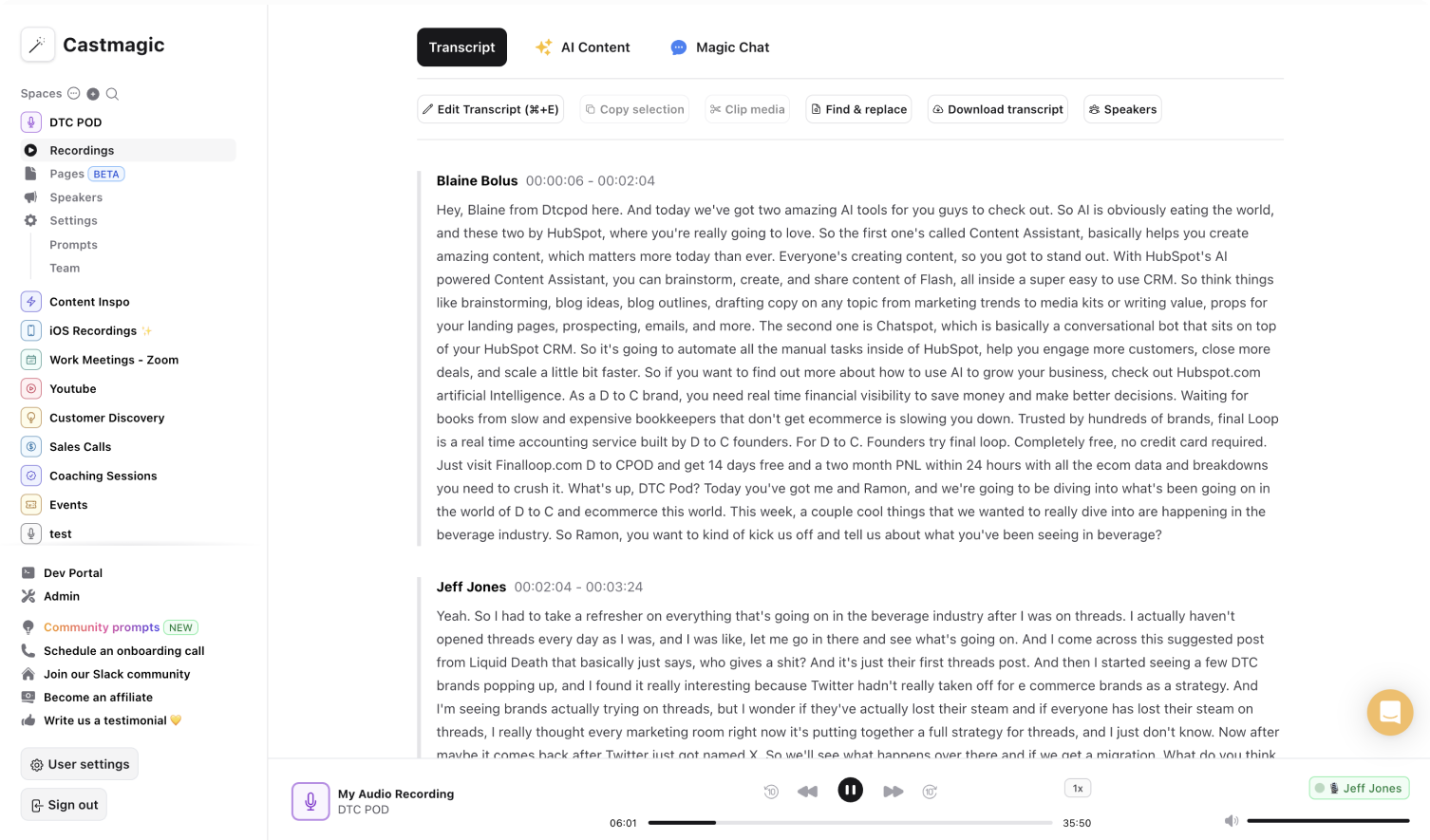

Sofortiger und sicherer KI-gestützter Audio-Transkriptionsdienst
Transkribieren Sie Audio in Text, indem Sie entweder eine Audiodatei zum Transkribieren hochladen oder Audio mit Ihrem Gerät aufnehmen. Castmagic transkribiert Ihre Audiodatei sofort und automatisch gibt Erkenntnisse aus und kuratiert den Inhalt anhand der Transkriptionen. Audio to Text war noch nicht so einfach. Sie benötigen nicht mehrere Tools, um Audio aufzunehmen, Audio zu transkribieren und Audiotranskriptionen in nutzbare Inhaltsressourcen umzuwandeln. Unser Ziel bei Castmagic ist es Ihnen, all Tools an einem Ort zur Verfügung zu stellen, um Ihnen während des gesamten Transkriptionsprozesses und der Inhaltserstellung Zeit und Energie zu sparen.
Erfassen Sie bequem jeden Moment, indem Sie Audio mit Castmagic aufnehmen. Sie überspringen den Aufwand, Ihre Sprachnotizen/Audiodateien herunterladen, auf Ihre Dropbox oder iCloud hochladen und dann an Ihren Transkriptionsdienst senden. Wenn Sie Castmagic als Sprachrekorder verwenden, entfallen diese zusätzlichen Schritte und Ihre Audiodateien werden sofort in praktische Audiotranskriptionen umgewandelt.
Castmagic as Dictionary device allows them, audio without completely einschränkungen. Castmagic als Transkriptionsdienst ermöglicht es Ihnen, mithilfe der Audiotranskription die Sprache in Text umzuwandeln und die wichtigsten Highlights aus jeder Sprachnotiz zu identifizieren. Castmagic als Transkriptionseditor optimiert die Erstellung von Inhalten mit anpassbaren Eingabeaufforderungen, die auf Ihre individuellen Ziele zugeschnitten sind. Optimize your effect with multiple content using automatisierter audiotranscriptions by Castmagic as your comprehensive solution for transcription service and language recorder in one.
We Power The Best Creators








How To Use Castmagic for Generator for audio to text

Tap to Record or Upload Audio File / Video File
Click the record button to playback what was said later. Rely on our voice recorder to actively engage in the moment. Castmagic instantly adds the voice memos you capture in our voice recorder app to your workspace. You can skip the step of exporting your voice memos as audio file into another transcription software because we do it all for you. If you have your own audio file or video file, click on 'Upload' and select your audio file that you'd like to add to Castmagic.

Transcribe Media
From voice recorder to transcription service, Castmagic automatically transcribe voice memos / audio files / video files. As soon as the transcription is done, you can label your recorded voices or make edits directly in the transcript.

Download Your Transcript
While on the Transcript page, click on "download transcript" button. That's it! You'll be able to select from multiple file formats including text, SRT, VTT, CSV, and custom formats.
Draft Content After Every Upload
Skip the hassle of replaying your audio recordings to create diverse materials. It's time-consuming to transcribe audio manually. We built Castmagic to be a voice recorder and transcription service that not only streamlines the voice recording process but also transcription and content extraction/creation process. Let your audio recordings work for you as we automatically transcribe audio to text.
Generator for audio to text & ContentExport Your Favorite Audio Clips
Our priority as a voice recorder and transcription service is to simplify every step. Select highlights from the audio recordings and transform them into audio highlights. Recording and transcribing are no longer separate processes. Record and transcribe voice memos all in one place.
Clips & Generator for audio to textCastmagic For iOS, Record On The Go
We built Castmagic to meet every need you might have with a voice recorder or transcription service. Tap to record voice memos and read automated audio transcriptions for greater contextual understanding. Castmagic makes it much easier to record audio files, transcribe audio to text, and identify major takeaways from every scheduled and unscheduled transcription opportunity.
Generator for audio to text with iOSEndless Content Assets In Seconds
Automate all the tedious work that comes in editing and copywriting and say hello to your new best content editor.
Integrate Content From All Your Favorite Platforms
 RSS
RSS  Zoom
Zoom  Google Drive
  Wistia
  Descript
  YouTube
  Vimeo
Vimeo  TikTok
  Instagram
  Twitch
  Loom
Loom  Zapier
 Professional Creators Love Castmagic
Castmagic is just a great product. When it came to creating content around The Calum Johnson Show it made our life a lot easier. Highly recommend

Frequently Asked Questions
Last updated June 2026 by the Castmagic team
Who is Castmagic for?
Castmagic is for podcast hosts, video streamers, or long form content creators that want to get more mileage out of their content. We make it easy to instantly turn your long form unstructured content into ready-to-use copy for shownotes, highlight clips, summaries, blogs, social posts, newsletters, and more.
How does it work?
Castmagic uses the best in class AI to turn your long form audio directly into the exact content types you need for ready to post creative.
Is there a free trial?
Yes you are entitled to a free trial to play with a few episodes and see how it works in action. If you like what Castmagic can do, we have several plans to choose from.
What languages are supported?
Castmagic transcribes in 60+ languages with automatic language detection, so you can chat with episodes recorded in most major languages, not just English.
Can I Convert an Audio File to Text?
Yes, you can convert an audio file to text using transcription tools. Castmagic, for example, can automatically transcribe audio files like podcast episodes into text, making it easy to generate transcripts, summaries, or content.
Explore The Castmagic Blog…

Wie man ein Voice-Over macht: Anfängertipps für professionellen Sound

Podcast-Marketingstrategien: Bewährte Tipps für 2026

Beste Transkriptionssoftware für Podcaster: Sparen Sie Zeit mit KI-Tools

Podcast-Hintergrundideen: Schnelle Tipps für atemberaubende Videos

6 Best Otter.ai Alternatives in 2026 (Free and Paid)

5 Best Fireflies.ai Alternatives in 2026 (Free and Paid)

5 Best Repurpose.io Alternatives in 2026 (By What You Actually Need)

Die besten Content-Marketing-Tools, die Sie für 2026 benötigen