YouTube-Videozusammenfassung
Laden Sie YouTube-Videos hoch und erstellen Sie mit Castmagic ganz einfach Zusammenfassungen. Wir verwandeln Ihre Videoinhalte in schriftliche Zusammenfassungen, die Sie für verschiedene Inhaltsformen verwenden können, um für Ihren YouTube-Kanal zu werben. Sparen Sie Zeit und Mühe beim Kuratieren von Social-Media-Inhalten und Optimieren Ihrer Videoinhalte auf YouTube mit einem Videozusammenfasser, der das für Sie erledigt.
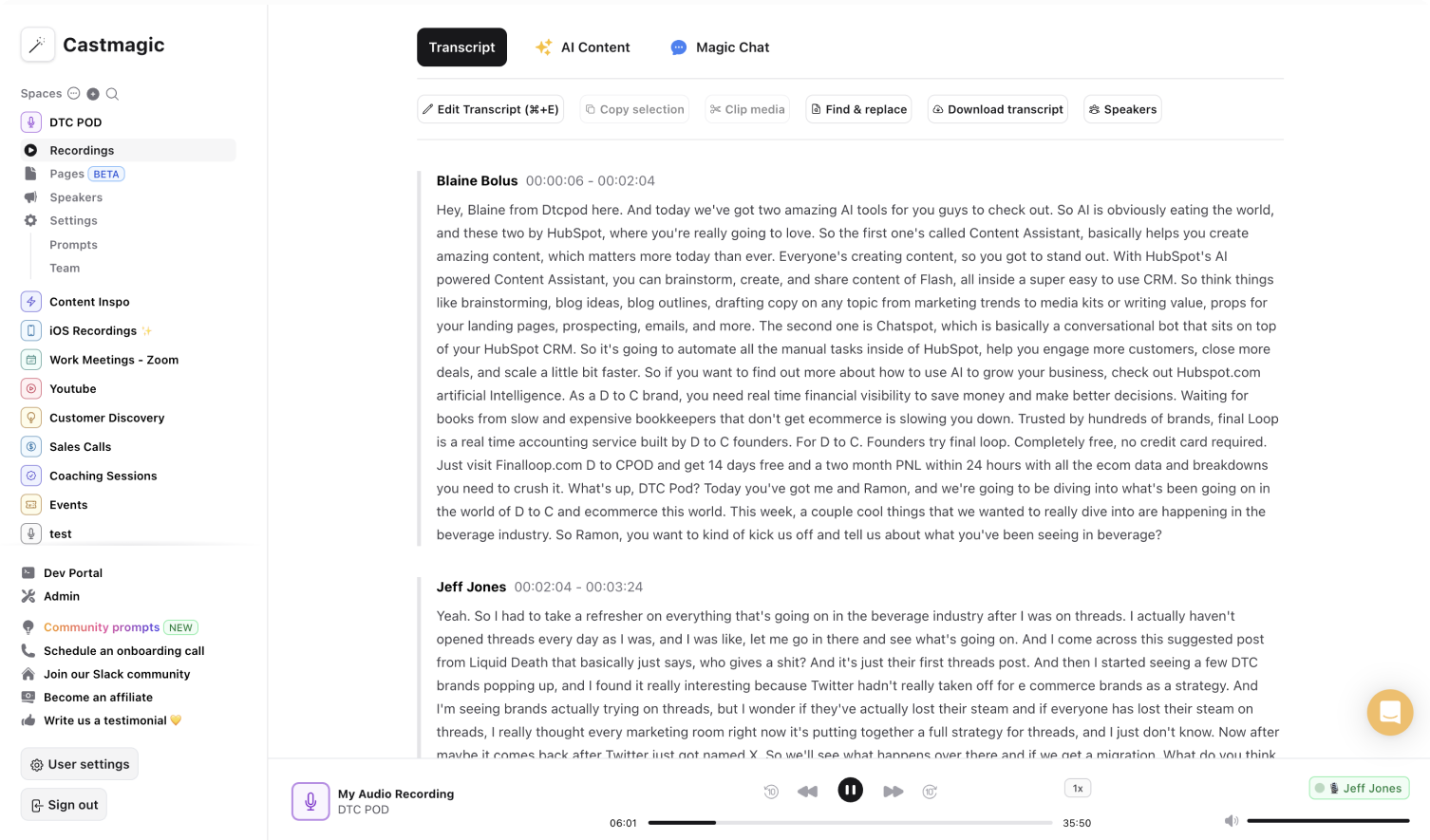

Sofortiger, sicherer und automatischer YouTube-Videozusammenfassung
Castmagic maximiert die Wirkung jedes YouTube-Videos, ohne Zeit oder Energie zu opfern. Unser Ziel ist es, Sie während des gesamten Prozesses zu unterstützen, vom Hochladen Ihres YouTube-Videos über die Erstellung von Zusammenfassungen bis hin zur Kuratierung verschiedener Inhalte in sozialen Medien.
In der Welt der Kurzform-Inhalte erfordern lange Videos eine verlockende und effektive Zusammenfassung mit den wichtigsten Punkten, Zeitstempeln und Schlüsselwörtern. Unser Tool zur Zusammenfassung von Videos verwendet Ihre Videoinhalte, um nicht nur genaue, sondern auch für Ihr Publikum optimierte Zusammenfassungen zu erstellen. Nutzen Sie unsere Tools, um jeder Zusammenfassung eine zusätzliche Note zu verleihen, indem Sie einen bestimmten Ton, eine bestimmte Zielgruppe oder einen bestimmten Inhaltstyp angeben, für den Sie die Zusammenfassung benötigen.
Während andere Videozusammenfassungen hier vielleicht aufhören, haben wir unseren Summarizer so konzipiert, dass er mehr kann, als nur Zusammenfassungen zu erstellen. Da wir dein YouTube-Video automatisch in Text transkribieren, birgt jedes Video-Transkript das Potenzial für grenzenlose Inhalte und Optimierungsempfehlungen. Castmagic ermöglicht es dir, aus automatisierten und genauen YouTube-Transkripten vielfältige Inhalte zu erstellen, um die Reichweite deines Publikums zu erhöhen. Verbringen Sie weniger Zeit damit, YouTube-Videos für die Erstellung von Inhalten manuell zu transkribieren, und verbringen Sie mehr Zeit mit dem, was wirklich wichtig ist — der Erstellung fesselnder YouTube-Videos, die bei Ihren Abonnenten Anklang finden.
We Power The Best Creators








How To Use Castmagic for YouTube-Videozusammenfassung

Upload Your Video File or Paste YouTube URL
Click on ‘Upload’ and select your YouTube video file that you'd like to add to Castmagic. You can also drag and drop your file into the box, or import directly with your YouTube link.

Transcribe Media
Label your file name, and hit 'Save Recording'’. Castmagic will automatically transcribe your file. As soon as the file is done, you'll be able to label your speakers or make any edits directly in the transcript.

Download Your YouTube Transcript
While on the Transcript page, click on "download transcript" button. That's it! You'll be able to select from multiple file formats including text, SRT, VTT, CSV, and custom formats.
Streamline Content Creation Across Social Media
Castmagic allows you to generate content that goes beyond YouTube. YouTube summarizations can be transformed into a tweet, LinkedIn post, Instagram caption, and more. It's strategic to manage multiple social media accounts to promote your YouTube channel. Draw in viewers in an effortless way as we transform your YouTube video into any social media content that you might need. With just one click, you can share content that drives SEO search and encourages viewers to watch your latest YouTube video.
YouTube-Videozusammenfassung & ContentTrim and Export Your Favorite Audio & Video Clips From Your YouTube Videos
Select your favorite parts from your YouTube videos and turn them into audio or video highlights. No extra work is necessary to transform the best YouTube parts into diverse content forms. Increase your audience reach with accessible content forms. You may have come for YouTube summaries, but we promise you will leave with more.
Clips & YouTube-VideozusammenfassungCastmagic For iOS, Record Content On the Go
Put Castmagic in your pocket. Tap to record on the go. Your recordings instantly sync with your Castmagic workspace. Capture content ideas, video sounds, or anything YouTube related without all your tech gear. With Castmagic, YouTube videos aren't confined to start behind the camera in the studio. Get YouTube content anytime and anywhere.
YouTube-Videozusammenfassung with iOSEndless Content Assets In Seconds
Automate all the tedious work that comes in editing and copywriting and say hello to your new best content editor.
Integrate Content From All Your Favorite Platforms
 RSS
RSS  Zoom
Zoom  Google Drive
  Wistia
  Descript
  YouTube
  Vimeo
Vimeo  TikTok
  Instagram
  Twitch
  Loom
Loom  Zapier
 Professional Creators Love Castmagic
Castmagic is just a great product. When it came to creating content around The Calum Johnson Show it made our life a lot easier. Highly recommend

Frequently Asked Questions
Last updated June 2026 by the Castmagic team
Who is Castmagic for?
Castmagic is for podcast hosts, video streamers, or long form content creators that want to get more mileage out of their content. We make it easy to instantly turn your long form unstructured content into ready-to-use copy for shownotes, highlight clips, summaries, blogs, social posts, newsletters, and more.
How does it work?
Castmagic uses the best in class AI to turn your long form audio directly into the exact content types you need for ready to post creative.
Is there a free trial?
Yes you are entitled to a free trial to play with a few episodes and see how it works in action. If you like what Castmagic can do, we have several plans to choose from.
What languages are supported?
Castmagic transcribes in 60+ languages with automatic language detection, so you can chat with episodes recorded in most major languages, not just English.
How Do I Add Subtitles to IG Reel?
To add subtitles, you can use a tool like Castmagic to automatically transcribe the audio from your video. Once transcribed, you can easily add the text as captions to your reel.
How to get text from Instagram reels?
Simply upload the reel in audio or video format, and we will automatically convert the audio into text.
How can I make my Instagram Reels accessible for all viewers?
To make your Instagram Reels accessible for all viewers, consider adding closed captions or subtitles to convey dialogue or audio content. Additionally, use descriptive alt text when posting images to ensure accessibility for visually impaired audiences. The easiest to do this is to use a transcription service.
Discover more usecases
Explore The Castmagic Blog…

So wählen Sie die besten Voice-to-Text-Apps für Sie aus

Strategien zur Produktion von Unternehmensvideos für Remote-Teams

Beste KI-Apps für Entwickler: Die besten Tools, die Sie jetzt benötigen
6 Best OpusClip Alternatives in 2026 (Free and Paid)

Podcast-Marketingstrategien: Bewährte Tipps für 2026

So verwenden Sie KI für das Marketing für kleine Unternehmen: Verdienen Sie mehr Geld

ChatGPT-Alternativen: Beste kostenlose KI-Tools für 2026

So generieren Sie mithilfe von KI-Tools schnell großartige Podcast-Titel