
Transkription der Podiumsdiskussion
Podiumsveranstaltungen können eine Vielzahl von Formen annehmen, sei es eine Kamingesprech, eine Konferenz, eine virtuelle Veranstaltung, eine Präsentation oder mehr. Trotz der Version bleibt die Komplexität der Planung konstant. Von der Finalisierung der Podiumsthemen bis hin zu den Diskussionsteilnehmern, häufig gestellten Fragen, Einführungen von Moderatoren und Moderatoren, Diskussionsthemen, Fragen und Antworten, Umfragen und vielem mehr — Veranstaltungsplaner haben viel um die Ohren. Unser Ziel ist es, Veranstaltungsplaner, Moderatoren, Moderatoren und sogar Diskussionsteilnehmer in die Situation zu versetzen, ihre gesamte Energie und Zeit auf das Gespräch zu konzentrieren. Wir kümmern uns möglicherweise um die Transkription und alle Inhalte, die Sie benötigen.
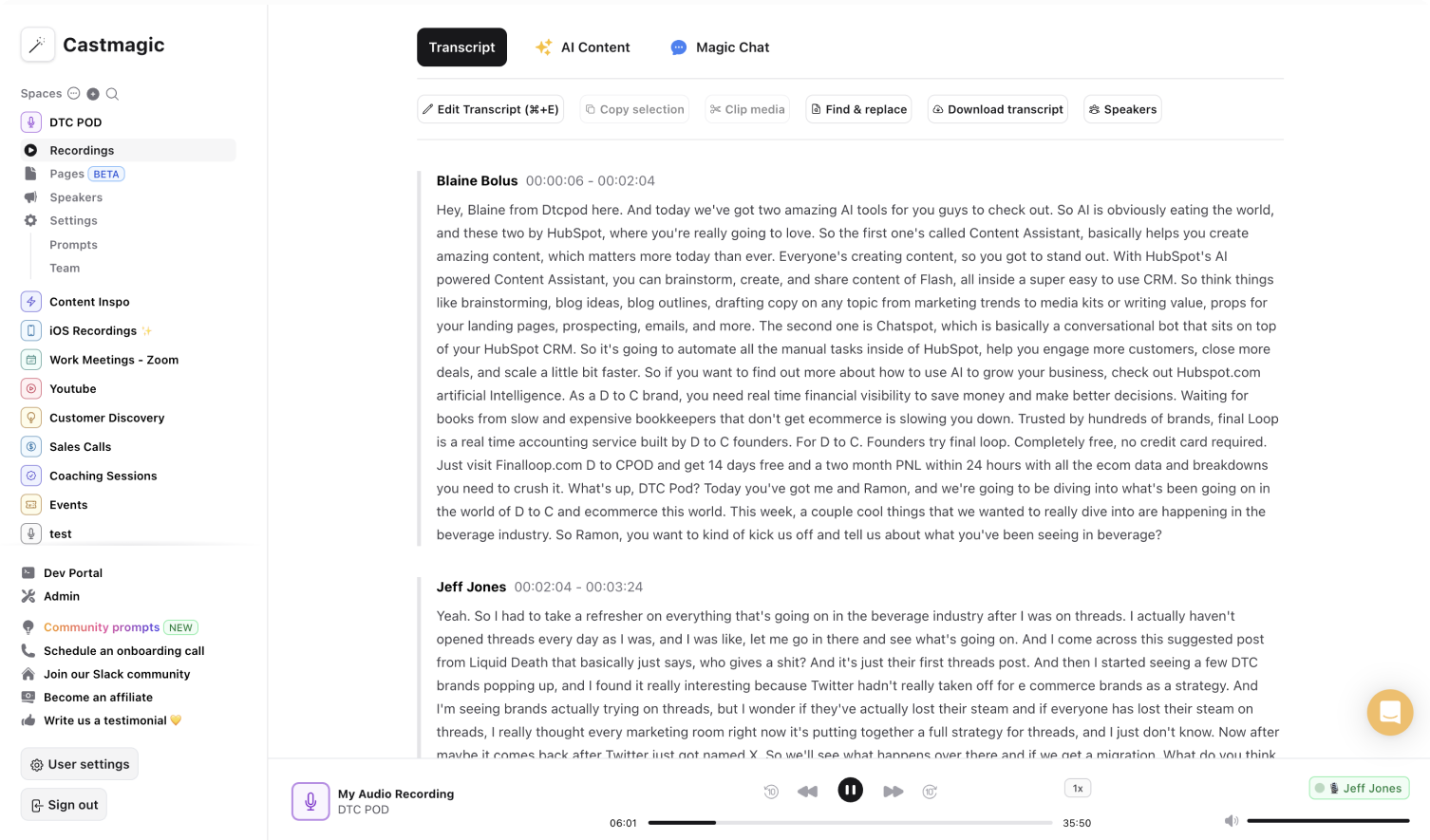

Sofortige, sichere und automatische KI-Transkriptionen für Podiumsdiskussionen
Eine ansprechende Podiumsdiskussion ist entscheidend für eine erfolgreiche Kamingesprech, eine virtuelle Veranstaltung/Präsentation, unabhängig davon, um welche Podiumsveranstaltung es sich handelt. This requires to think about and interessantes discussion themes, to make questions to make and to different views. Für Moderatoren, Moderatoren oder Veranstaltungsplaner kann es jedoch schwierig sein, eine effektive Podiumsdiskussion von Grund auf neu zu planen. Was wäre, wenn Sie das nicht müssten?
Castmagic offers a solution to remove the pressure, a new event theme, -format and also to identify a new theme. Unsere Transkriptionssoftware macht es einfach, alle vorherigen Podiumsdiskussionen oder Konversationen, die Sie geführt haben, hochzuladen und auf ihren eigenen Erfahrungen aufzubauen. Es ist so zeitaufwändig, Aufzeichnungen von Ihnen oder ihren Teamkollegen erneut auf der Hauptbühne anzusehen und während der Podiumsdiskussion mit dem Publikum und den Diskussionsteilnehmern zu interagieren. Sie verlassen sich auf die Genauigkeit unserer KI-Transkriptionssoftware, anstatt das Spiel anzuhalten und das Spiel zu spielen, um die wichtigsten Erkenntnisse, erfolgreichen Diskussionsthemen, das Podiumsformat, Anfragen zum Stellen von Fragen und mehr zu identifizieren.
Castmagic kann nicht nur die nächste Podiumsdiskussion planen, sondern auch alle Inhalte kuratieren, die Sie möglicherweise benötigen, um für die vorherige Podiumsdiskussion zu werben. Sie lassen die Höhepunkte zwischen dem Moderator und den Diskussionsteilnehmern zeigen und sogar dem Publikum, wie geschlossen Ihre Podiumsdiskussion ist. They demonstration the engagement of the podiumsdiskussion with ausschnitte from the camingesprech, the virtually veranstaltung/the podium discussion, to not only the standing binding between the public and the discussion participants and the moderator, but also a new group of people. Share the unvergesslichen erkenntnisse from the Podium discussion with other, to take discussion and discussion online, and it to allow the participants to allow their different perspectives and points to the theme. Castmagic macht es einfach, die Podiumsdiskussion online fortzusetzen.
We Power The Best Creators








How To Use Castmagic for Transkription der Podiumsdiskussion

Upload Audio or Video File of Your Conferences
Click on ‘Upload’ and select your audio file or video file that you'd like to add to Castmagic. You can also drag and drop your file into the box or import your file with Zapier if it's a Zoom recording or Google Meet recording.

Transcribe Media
Label your file name, and hit 'Save Recording'’. Castmagic will automatically transcribe your file. As soon as the file is done, you'll be able to label your moderator, panelists, and audience remarks. You can also make any edits directly in the transcript.

Download Your Transcript
While on the Transcript page, click on "download transcript" button. That's it! You'll be able to select from multiple file formats including text, SRT, VTT, CSV, and custom formats.
Draft Actionable & Impactful Content After Every Panel Discussion
What drives engagement? Your audience asking questions. Your panelists' remarks prompting conversation and debate. As a moderator and presenter, you've already done your job when the panelists and audience showcase engagement in the panel discussion. Let the effort invested to make this a reality reap more results for you. Skip the hassle of rewatching panel discussion recordings to accurately transcribe the conversation/ conference/fireside chat/virtual event and craft follow-up materials including summarized overview, agenda, social media content, question and answer list, conversation topics covered, and more. We built Castmagic to be a transcription software that not only transcribes your panel discussion recordings but also enables your transcriptions to work for you. Listen to the panel discussion once, and leave the audio transcription or video transcription to us and see the influence an accurate and actionable panel discussion transcription can have.
Transkription der Podiumsdiskussion & ContentExport Your Favorite Audio & Video Clips From Panel Discussions
Select the notable points from the panel discussion transcription and turn them into audio or video highlights. No extra work necessary to transform the highlights into diverse, searchable content to further your audience reach.
Clips & Transkription der PodiumsdiskussionCastmagic For iOS, Record Panel Discussions Live
Put Castmagic in your pocket. Tap to record audio and instantly sync with your workspace. Capture action items, key points, and memorable points from panel discussions in real time. Castmagic offers a transcription software that makes it easy to record audio, transcribe the speech to text, and pinpoint major takeaways - in real time.
Transkription der Podiumsdiskussion with iOSEndless Content Assets In Seconds
Automate all the tedious work that comes in editing and copywriting and say hello to your new best content editor.
Integrate Content From All Your Favorite Platforms
 RSS
RSS  Zoom
Zoom  Google Drive
  Wistia
  Descript
  YouTube
  Vimeo
Vimeo  TikTok
  Instagram
  Twitch
  Loom
Loom  Zapier
 Professional Creators Love Castmagic
Castmagic is just a great product. When it came to creating content around The Calum Johnson Show it made our life a lot easier. Highly recommend

Frequently Asked Questions
Last updated June 2026 by the Castmagic team
Who is Castmagic for?
Castmagic is for podcast hosts, video streamers, or long form content creators that want to get more mileage out of their content. We make it easy to instantly turn your long form unstructured content into ready-to-use copy for shownotes, highlight clips, summaries, blogs, social posts, newsletters, and more.
How does it work?
Castmagic uses the best in class AI to turn your long form audio directly into the exact content types you need for ready to post creative.
Is there a free trial?
Yes you are entitled to a free trial to play with a few episodes and see how it works in action. If you like what Castmagic can do, we have several plans to choose from.
What languages are supported?
Castmagic transcribes in 60+ languages with automatic language detection, so you can chat with episodes recorded in most major languages, not just English.
What are things I need to look for in a panel discussion transcription service?
When selecting a panel discussion transcription service, look for a service that guarantees high accuracy rates, offers fast turnaround times to meet your deadlines, and ensures the confidentiality of your sensitive information. All things that Castmagic offers.
Discover more usecases
Explore The Castmagic Blog…
Fireflies.ai Pricing (2026): Free Plan, Pro vs Business, and Is It Worth It?

Beste generative KI-Plattformen: Funktionen, die sie auszeichnen (und warum Castmagic bei Inhaltserstellern führend ist)

Die besten Marketingtools für kleine Unternehmen im Jahr 2026

So nehmen Sie Audio auf dem iPhone auf: Einfache Schritte für Anfänger

Wie lang kann ein Instagram-Reel sein: Was du wissen musst

Bester Generator für Diskussionsbeiträge: Lassen Sie KI für Sie recherchieren

Wie man ein Voice-Over macht: Anfängertipps für professionellen Sound

So schneidest du ein YouTube-Video aus: Einfache Anleitung für Snippets
