

Maximize Your Podcast's Reach: A Comprehensive Guide to Podcast Content Repurposing
I. Introduction to repurposing podcast content
The importance of repurposing podcast content
In today's fast-paced digital landscape, content creators are constantly competing for the attention of audiences. Podcasts have gained significant popularity, but capturing and retaining listeners requires more than just producing high-quality audio content. Repurposing podcast content helps creators maximize their reach and engage with audiences across multiple platforms.
There are several benefits to repurposing your content, such as increased reach, audience growth, and better SEO. By sharing your content on various platforms, you can reach a wider audience. Repurposing also allows you to cater to different audience preferences, attracting new listeners and subscribers. Additionally, creating written content from your podcast episodes can improve your website's search engine ranking and drive organic traffic.
II. Identifying the best content for repurposing
Analyzing your top-performing episodes
To maximize your content repurposing efforts, start by analyzing your top-performing episodes. Look at your podcast analytics to determine which episodes have received the most listens, downloads, or engagement. Consider the topics and formats of these episodes, and identify any patterns or trends. Focus on repurposing content from these successful episodes to capitalize on proven audience interest.
Finding evergreen topics is another essential aspect of content repurposing. Evergreen content remains relevant and valuable over time, making it ideal for repurposing. Identify topics within your podcast episodes that are not time-sensitive or tied to specific events. Prioritize repurposing evergreen content to ensure long-lasting appeal and relevance.
Using audience feedback and questions can help you create content that resonates with your listeners. Monitor comments and reviews on your podcast and related social media platforms to gather insights into what your audience enjoys. Address common questions or concerns raised by your listeners in your repurposed content, and engage with your audience by inviting them to share their thoughts and ideas for potential content.
Effective Ways to Repurpose Your Podcast Content
1. Turn Podcasts Into Blogs & Articles
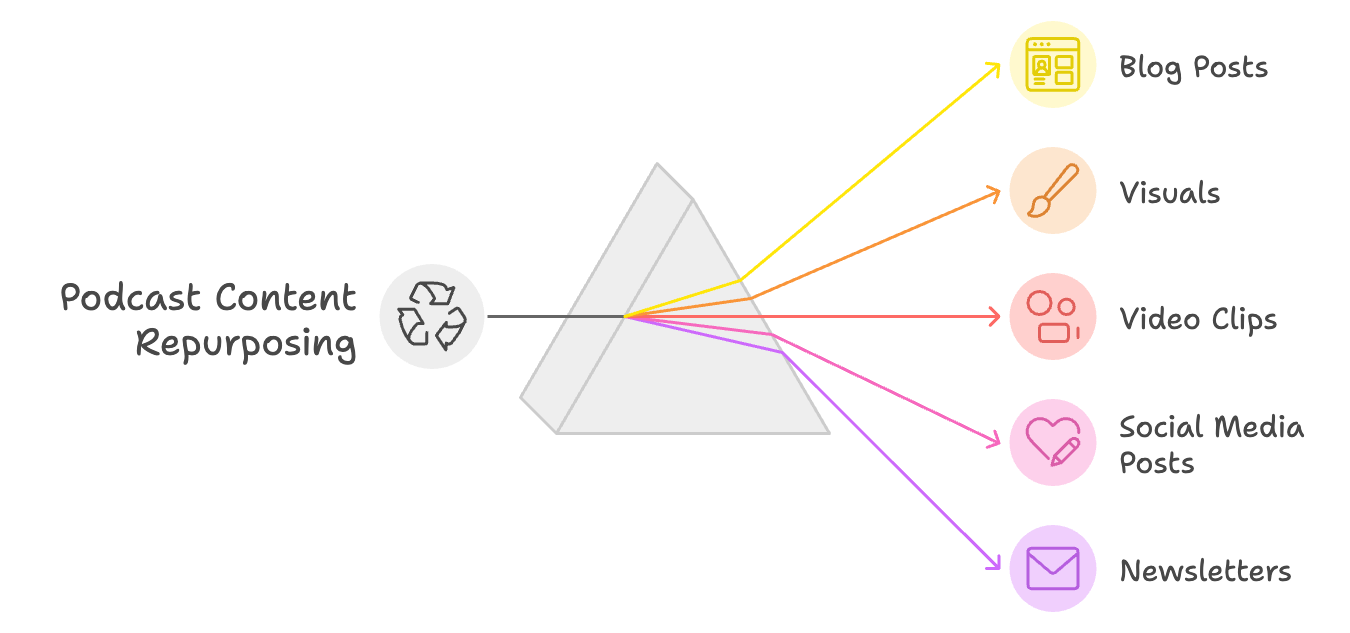
One popular way to repurpose podcast content is by creating blog posts and articles. Turn your podcast episodes into written content for your website or guest posts on relevant platforms. Use transcripts, timestamps, and episode highlights to structure your articles and emphasize key points. Including quotes and personal anecdotes from the podcast can create engaging and shareable content.
2. Make Eye-Catching Visuals
Design eye-catching visuals to transform key points, quotes, or statistics from your podcast into visually appealing infographics or social media images. Use consistent branding and design elements to create a recognizable visual identity for your podcast. Share visuals on platforms like Instagram, Pinterest, and LinkedIn to reach new audiences and drive engagement.
3. Create Short Video Clips
Producing short video clips is another effective way to repurpose your podcast content. Edit your podcast episodes into shorter video clips highlighting interesting or thought-provoking segments. Add captions, visual elements, and animations to make the clips more engaging and accessible. Share video clips on social media platforms like YouTube, Facebook, and Twitter to reach viewers who prefer video content.
4. Consistent Social Media Posts
Craft social media posts and threads using key takeaways, quotes, and questions from your podcast episodes. These posts can spark engagement and conversation. Share bite-sized content in the form of tweet threads, Instagram Stories, or LinkedIn posts to provide value and drive traffic to your podcast. Engage with your audience by responding to comments, encouraging feedback, and asking questions to foster a sense of community around your podcast.
5. Podcast Newsletter
Developing newsletter content is another great way to repurpose podcast content. Curate content from your podcast episodes, including insights, quotes, and episode summaries, to create informative and engaging newsletters. Use newsletters to share updates, announce new episodes, and provide exclusive content for your subscribers. Encourage readers to share your newsletters with their networks to
III. The 5 Essential Things To Do With Your Content
1. Updates and announcements:
Keep your subscribers in the loop by sharing news about upcoming episodes, special guests, or events related to your podcast. This helps build excitement and anticipation among your audience.
2. Episode summaries:
Provide brief recaps of your recent podcast episodes, along with links to listen. This is an excellent way to remind subscribers about content they may have missed and encourage them to tune in.
3. Exclusive content:
Offer your subscribers something special that they won't find anywhere else. This could be bonus interviews, behind-the-scenes information, or access to early releases of new episodes.
4. Quotes and insights:
Share thought-provoking or memorable quotes from your podcast episodes. These snippets can pique your subscribers' interest and encourage them to share your content with others.
5. Calls to action:
Encourage your readers to share your newsletter with their friends, leave a review on their favorite podcast platform, or engage with you on social media. This helps spread the word about your podcast and fosters a sense of community among your listeners.
IV. How Castmagic helps you leverage your podcast content for growth
1. Streamlined content generation
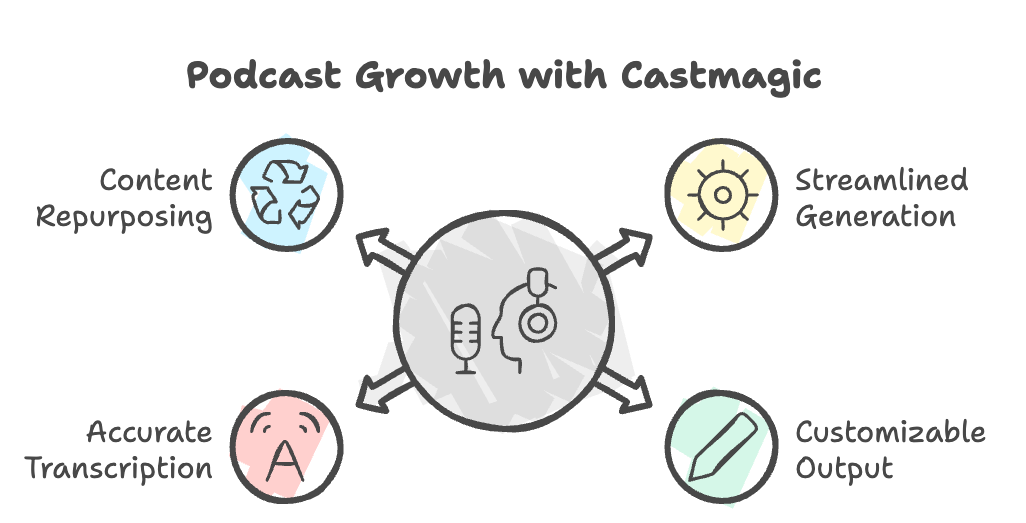
Castmagic's AI-powered platform generates a wide variety of content formats for each podcast episode, including transcripts, titles, keywords, and more. This saves you time and effort by having all your content assets generated in one place, enabling you to focus on other aspects of your podcast.
2. Customizable content output
Use Castmagic's Magic Chat feature to generate custom content prompts tailored to your specific needs and audience preferences. By adjusting the prompts and fine-tuning the AI-generated output, you can create unique, engaging content for different platforms.
3. Speaker labeling and transcription accuracy
Castmagic's speaker labeling feature allows you to accurately identify and label speakers within your podcast episodes, ensuring accurate transcripts and content outputs. This helps improve the quality and relevance of your content by providing accurate speaker information and context for your audience.
4. Seamless content repurposing
With Castmagic's wide range of content outputs, repurposing your podcast content for different platforms becomes a breeze. Use Castmagic-generated content to create blog posts, social media posts, newsletters, and other marketing assets with minimal effort.
V. Conclusion
1. The importance of content marketing for podcast growth
Effective content marketing helps podcast creators reach new audiences, increase engagement, and drive listener loyalty. By repurposing podcast content for various platforms, podcast creators can maximize their reach and make the most of their efforts.
2. How Castmagic simplifies and enhances content marketing for podcasters
Castmagic's AI-powered platform streamlines content generation and repurposing, saving time and resources for podcast creators. With customizable content output, speaker labeling, and a wide range of content formats, Castmagic empowers podcast creators to create engaging and impactful content marketing strategies.
In conclusion, repurposing your podcast content is a powerful way to grow your audience and make the most of your hard work. By analyzing your top-performing episodes, identifying evergreen topics, and leveraging audience feedback, you can create content that resonates with your listeners across various platforms. With tools like Castmagic at your disposal, you'll be well on your way to maximizing your podcast's reach and turning your listeners into loyal fans.
More blogs like this

Can You Screen Record FaceTime Videos? What You Need to Know
People record FaceTime calls for many reasons: preserving family memories, documenting work meetings, creating tutorials, or saving important conversations. Whatever your purpose for wanting to record FaceTime audio, this guide will walk you through what you need to know.

Corporate Video Production Strategies for Remote Teams
Remote corporate video production, when done right, can be more efficient, creative, and cost-effective than ever before. The key is understanding how to build corporate video frameworks that work for distributed teams while maintaining the quality and consistency your brand demands.

6 Best Riverside Alternatives in 2026 (Free and Paid)
Looking for a Riverside (riverside.fm) alternative? Here are the 6 best, sorted by the job you need done: remote recording, live streaming, editing, or turning your episodes into content.

Best AI Apps for Creators: Top Tools You Need Now
AI models have shown us that we're fully immersed in a revolution transforming how content gets made, edited, and shared. If you're still creating content the old-fashioned way, you're working twice as hard for half the results. The best AI tools are here to supercharge your creative workflow, and we're going to show you exactly which apps deserve a spot in your creator toolkit.
6 Best OpusClip Alternatives in 2026 (Free and Paid)
Looking for an OpusClip alternative? Here are the 6 best, sorted by the job you need done: clips plus full content from one upload, cheaper clipping, captions, or hands-on editing.

Guide to Creating a Podcast App: Features You Need
Whether you're targeting content creators looking for better monetization tools or audiences seeking personalized recommendations, the features you choose will make or break your app's success. In this quick and easy guide, we're diving deep into everything you need to know about creating a podcast app that stands out today. From must-have functionalities to advanced features that'll set you apart, we've got you covered!

7 Best Descript Alternatives for 2026
Looking for a Descript alternative? Here are the 7 best, what each is actually for, and the one that turns a single recording into a week of content.

How to Find Zoom Recordings: Step-by-Step Guide
Picture this: You've just wrapped up an important client presentation, a critical team brainstorming session, or an educational webinar that you absolutely needed to reference later. You hit that record button during your Zoom meeting, breathed a sigh of relief knowing everything was captured, and then... where did it go?

How to Do a Voice Over: Beginner Tips for Professional Sound
Ever wondered why some voiceovers make you stop scrolling while others make you hit skip faster than you can say "subscribe"? The simple fact is, viewers are far more likely to abandon a video with poor audio quality than one with lower-quality visuals. Yep - you read that correctly. Your voice and audio matter more than your fancy camera!