

8 Best AI Video Generators Your YouTube Channel Needs
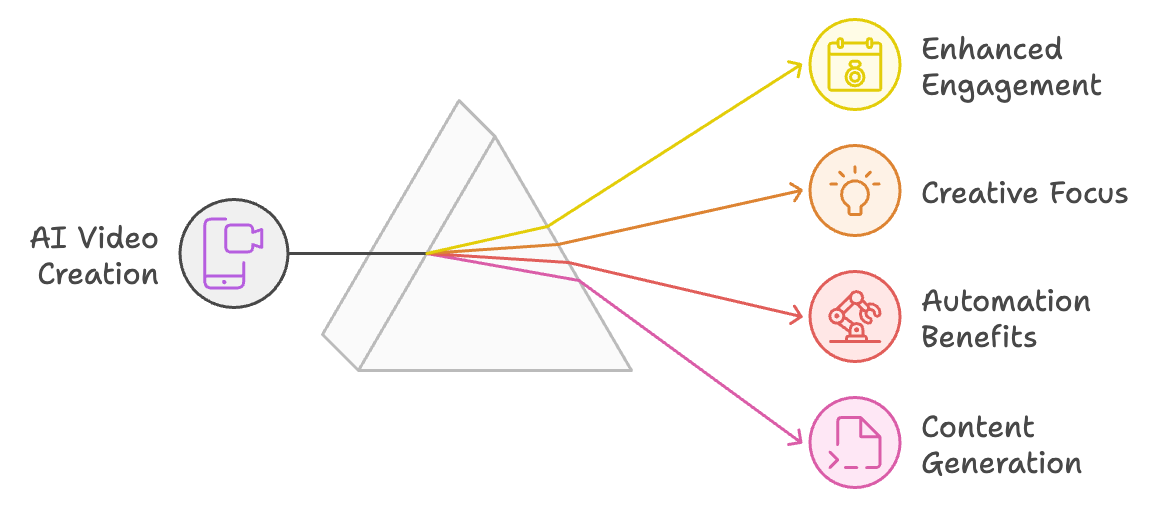
Artificial intelligence, or AI, is rapidly reshaping the way videos are created and published, making it much easier and faster to create top-tier content for leading platforms like YouTube. By automating many of the more time-consuming tasks, like editing, effects, and even script creation, AI tools are beginning to enable creators to focus more intensely on creativity and less on technical and clerical aspects of production.
One of the most transformative technologies so far is “video to video” technology, where AI is given existing videos and uses those to create new versions that enhance or change certain stylistic elements to cultivate more engagement.
Another amazing technology? Text to video where you can create long form YouTube content with a script, a blog post, and more. Bottom line - AI tools are changing the game for creators!
With that in mind, below we’re going to look at the eight best AI video generators your YouTube channel may want to consider. Then, we'll explore how you can leverage AI tools to create videos, YouTube Shorts, and so much more. Let's get into it.
Top AI Video Generators

If you're looking for software that can help you automate your workflow and produce AI generated videos, here are eight of the best on the market:
Runway ML
Runway ML is perfect for creative professionals who need robust editing capabilities. It allows users to apply consistent styles across video frames and easily modify elements via simple text commands, making sophisticated video production accessible to all.
Fliki
Fliki shines in turning text into captivating videos with its vast library of stock media and over 2000 text-to-speech voices in more than 75 languages. It's an excellent tool for bloggers and marketers to add audio into videos from text they've already created to repurpose into engaging promotional materials efficiently.
Pika Labs
Pika Labs offers a unique approach to AI video creation that is particularly suitable for users familiar with Discord. It provides extensive customization options and is currently free during its Beta phase, making it an attractive option for experimental content creators.
HeyGen
HeyGen is ideal for beginners, offering easy-to-use features that include a wide selection of AI avatars and automated voices. Its platform simplifies the video creation process, allowing users to produce compelling content quickly and affordably.
Synthesia
Synthesia stands out for its ability to create highly realistic AI avatars and voiceovers, making it a top choice for professional video creation. It supports over 120 languages and offers extensive customization, ideal for producing engaging and diverse video content across global markets.
DeepBrain AI
DeepBrain AI excels in generating AI avatar-based video content, and is particularly useful for creating training and explainer videos. It offers photorealistic avatars and supports numerous languages, significantly reducing the time and cost of video production while maintaining a high level of authenticity.
Colossyan
Colossyan is designed for creating professional training and explainer videos, featuring over 30 AI actors that can display a range of emotions and speak in over 70 languages. Its intuitive interface and advanced customization options make it ideal for businesses looking to enhance their internal and external communication strategies.
Invideo
Invideo caters to content marketers with its extensive template library suitable for various platforms like YouTube and Instagram. It supports script generation and customizable branding tools, making it easy to produce tailored and engaging videos quickly. Invideo's approach is particularly valuable for creating consistent and professional-looking social media content.
Related: Check out our post "Youtube Studio: A Comprehensive Guide To Managing Your Channel"
What to Look for When Shopping for AI Video Generators
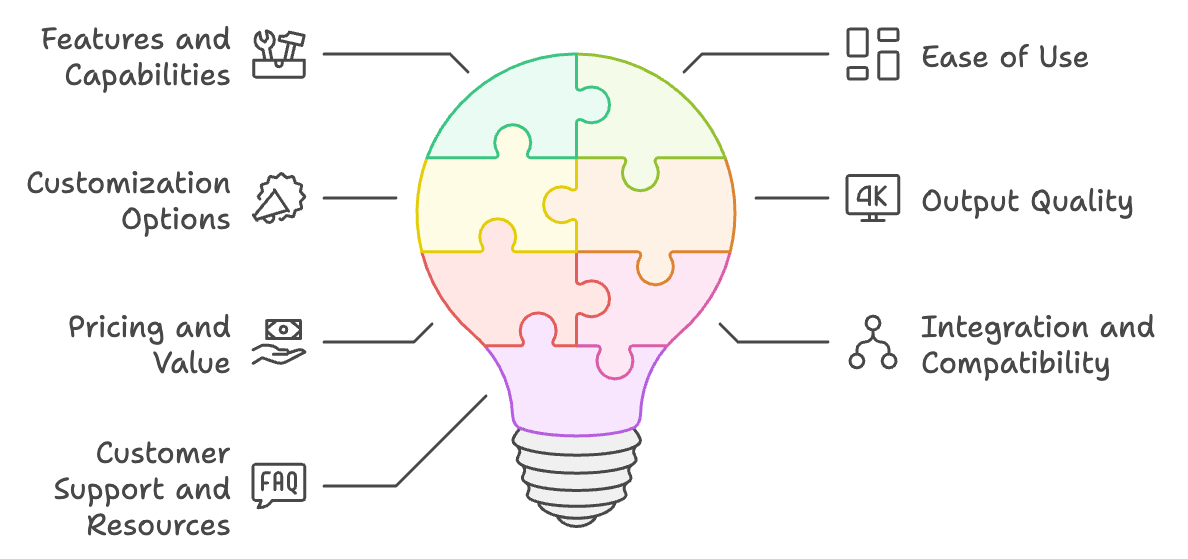
When looking to purchase AI video generators, there are several key factors to consider:
1. Features and capabilities
Evaluate the specific features each AI video generator offers and ensure they align with your content creation needs. Look for tools that provide the functionality you require, such as text to video, script generation, avatar creation, voiceovers, and multi-language support.
2. Ease of use
Consider the learning curve associated with each tool. Some AI video generators are designed for beginners, while others cater to more experienced users. Choose a tool that matches your technical proficiency and offers an intuitive interface to streamline your workflow.
3. Customization options
Assess the level of customization each AI video generator provides. Look for tools that allow you to tailor the output to your specific brand guidelines, such as adding logos, fonts, and color schemes. The ability to fine-tune the AI-generated content will help ensure your videos maintain a consistent and professional look.
4. Output quality
Evaluate the quality of the videos generated by each tool. Look for AI video generators that produce high-resolution, visually appealing content. Pay attention to the realism of AI avatars, the naturalness of voiceovers, and the overall polish of the generated videos.
5. Pricing and value
Compare the pricing plans of different AI video generators and assess their value for money. Some tools offer free trials or have free plans with limited features, allowing you to test them before committing to a purchase. Consider your budget and the long-term costs associated with each tool.
6. Integration and compatibility
Check if the AI video generator integrates with your existing content creation tools and platforms. Seamless integration can save time and effort in your workflow. Additionally, ensure that the generated videos are compatible with your target platforms, such as YouTube, and adhere to their guidelines.
7. Customer support and resources
Look for AI video generators that offer reliable customer support and have a wealth of resources, such as tutorials, FAQs, and user communities. Having access to helpful resources and responsive support can be invaluable when learning to use a new tool or troubleshooting issues.
By carefully considering these factors, you can make an informed decision when purchasing an AI video generator that best suits your YouTube channel's needs and helps you create engaging, high-quality content more efficiently.
Related: Check out our guide to YouTube Studio.
Video Creation is Made Easier with Tools Like Castmagic
AI technology can substantially improve the way you craft your YouTube content by streamlining processes and unleashing creativity. One of the AI tools that can help you streamline your workflow is Castmagic. This amazing all-in-one platform not only transcribes but also converts your audio and video content into various formats like articles and social media posts. Ideal for creators looking to streamline their production process, it automates editing and enhances content dissemination across platforms.
How to Utilize AI tools in Crafting Your YouTube Content
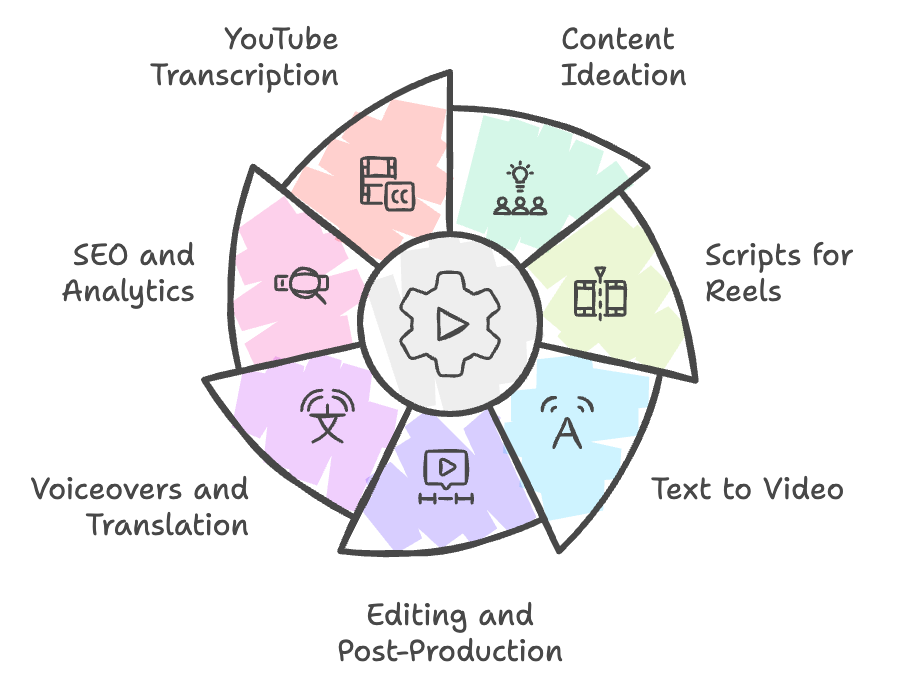
Here are just some of the ways to leverage AI tools like Castmagic and the AI generated video software we mention above to your channel’s advantage.
Content Ideation
AI tools can be a tremendous help in generating video ideas and brainstorming content based on trending topics, keywords, and even your past well-performing content. Tools like Castmagic analyze your previous videos and suggest themes that resonate with your audience.
Scripts for Reels
Castmagic has advanced large language model (LLM) functionality where all you need to do is give it your YouTube video, and the AI creates a script you can use to record YouTube Shorts and Reels for social media.
Text to Video
Many AI video generators have advanced text-to-video functionality where all you need to do is give it your script, and the AI creates the entire video from that script. This is perfect for explainer videos or similar educational content.
Editing and Post-Production
Smart Youtubers now they can use AI to streamline their post production workflow! AI tools can automate large portions of the editing process, from cutting pauses and gaps in your video and stitching clips together. They can also add effects that would typically need more sophisticated editing abilities.
Voiceovers and Translation
AI voice generators can create a range of voices speaking almost any language, making your content available to a global audience without the need to find and hire multiple voice talents. Many AI tools have several different AI voices you can choose from too making it much easier to find tones and inflections that fit your content needs.
SEO and Analytics
AI is perfect for creating optimized video titles, descriptions, and tags to make sure the viewers who want to find your content can do so easily and naturally, while advanced analytics give you priceless insights into your audience.
YouTube Transcription
Not only does AI transcription help with accessibility, but with a transcript you can produce all kinds of other types of content. Beyond the scripts for reels and social, you can plug your transcript into a tool like Castmagic and generate email newsletters, blog posts, and so much more! Click here to learn more about repurposing content like podcasts and YouTube videos.
The Future of AI in YouTube Video Creation
The future of AI in YouTube video creation is incredibly exciting and offers almost endless possibilities for boosting innovation as well as raw efficiency. As AI tools continue to evolve, they will continue to transform how we create content, making it much easier and faster to create captivating videos. If you want to save time and energy, it's a good idea to start looking into generative AI programs that can help streamline your workflows. And, when you’re ready to revolutionize your channel’s descriptions and enhance your keyword and promotion strategy, get a free trial of Castmagic today and experience the future of content creation.
More blogs like this

Best AI Social Media Post Generator: Improve Your Content Creation
Whether you're managing accounts for a trendy coffee shop or a global enterprise, AI tools have evolved from simple schedulers into intelligent creative partners that understand your brand voice and audience preferences. Let's dive into everything you need to know about AI social media post generators. We'll explore what makes these tools indispensable, how to choose the right one for your needs, and how to maximize their potential without sacrificing authenticity.
Riverside Pricing (2026): Free Plan, Pro vs Grow, and Is It Worth It?
Riverside pricing explained: what the free plan includes, what Pro, Grow, Webinar and Business cost monthly vs annually, the recording-hour limits, and whether it's worth it.

Best SEO Tools: Which Is the Best SEO Tools for Website Rankings
Agencies managing multiple clients spend a large percentage of their time simply compiling reports and analyzing data across disconnected platforms. This reality underscores why selecting the best SEO software for agencies is so critical for survival in the world of digital marketing.

How to Subscribe to a Podcast: Never Miss an Episode
We're going to walk you through everything you need to know about podcast subscriptions, from understanding what they really mean to mastering the process on all major platforms. Whether you're using Apple Podcasts, Spotify, YouTube Podcasts (formerly Google Podcasts), or another podcast app, we've got you covered!

10 Must Have YouTube Tools to Grow Your Channel
We’re betting if you landed on this page, you’re looking to take your YouTube channel to the next level. If we're right about this, then buckle up, because we’re about to share the must have YouTube Tools to grow your channel.

How to Do a Voice Over: Beginner Tips for Professional Sound
Ever wondered why some voiceovers make you stop scrolling while others make you hit skip faster than you can say "subscribe"? The simple fact is, viewers are far more likely to abandon a video with poor audio quality than one with lower-quality visuals. Yep - you read that correctly. Your voice and audio matter more than your fancy camera!

How to Clip a YouTube Video: Easy Guide for Snippets
Luckily, sometimes you don't need the whole ocean. You just need a single drop, a perfect moment, a snippet that captures exactly what you want to share. Whether it's a hilarious reaction from your favorite creator's livestream, an insightful tip buried in a hour-long tutorial, or a game-changing moment you want to share across your social media channels, learning how to clip a YouTube video is an essential skill for anyone creating or sharing content.

Best SEO Tools for Small Businesses in 2026
If you're running a small business in 2026, we've got some good news. You don't need a massive marketing budget or a team of SEO experts to compete with larger companies. What you do need are the best SEO tools for small businesses that can level the playing field and help you punch above your weight class.

How to Use AI Podcast Show Notes to Grow Your Show
What should take 30 minutes somehow stretches into two hours as you struggle to capture the essence of your conversation, identify key timestamps, and craft something that will actually help people discover your show. Sound familiar? Here's the thing though, search engines can't listen to your audio content. They rely entirely on text to understand what your episodes are about.