Academic Transcription
Whether you're a student or educator, save time and effort with an AI transcription service. Upload recordings of lectures, notes, academic research, seminars, webinars, interviews, dissertations, etc. to instantly transform them into usable academic transcripts.
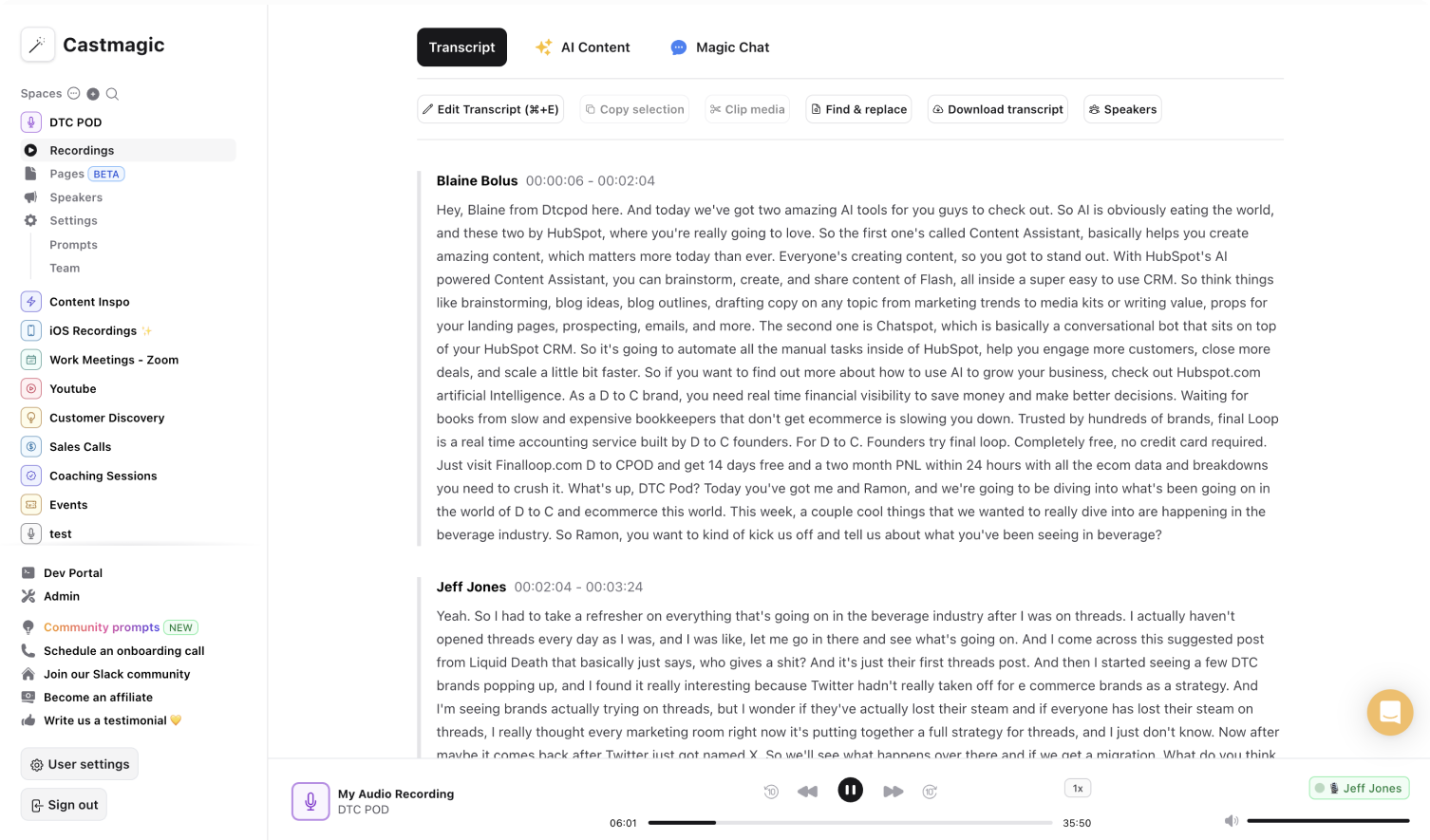

Instant, Secure & Automatic AI-Transcriptions for Academia
Lectures are dense with information. Students frantically engage in note taking or rewatch the lecture/seminar to understand the main concepts. Educators often transcribe interviews or focus groups to write dissertations for academic research. Verbatim transcripts are critical for both academic transcription and interview transcription. Castmagic offers a transcription service that streamlines transcription using AI, promising accuracy, to maximize your time eliminating the need to replay academic recordings and tackle material development using the transcripts instead.
While there are different transcription services, the best transcription service is the one that meets your unique needs. The instantaneous transcription process is the one consistent factor that we offer. The rest is customizable based on your needs and wants. You can upload content in a variety of ways, such as audio files, video files, links, or record using Castmagic. Customize prompts and tone based on your objectives with every transcription to curate a personalized content library. Quickly generate optimal content from transcriptions into materials for lectures, focus groups, seminars, interviews, and other academic events.
We understand how it seems like there's never enough hours in a day for students and educators. From your long to-do list, check off: transcribe, review for accuracy as a verbatim transcription, analyze transcription for highlights, and generate content. Our goal is to be the transcription service that offers an all-inclusive solution for academic transcription from transcription to drafting diverse academic materials.
We Power The Best Creators








How To Use Castmagic for Academic Transcription

Upload Audio or Video File
Click on ‘Upload’ and select your audio file or video file that you'd like to add to Castmagic. You can also drag and drop your file into the box or import your file with Zapier if it's a Zoom recording or Google Meet recording.

Transcribe Media
Label your file name, and hit 'Save Recording'’. Castmagic will automatically transcribe your file. As soon as the file is done, you'll be able to label your speakers or make any edits directly in the transcript.

Download Your Academic Transcript
While on the Transcript page, click on "download transcript" button. That's it! You'll be able to select from multiple file formats including text, SRT, VTT, CSV, and custom formats.
Draft Content After Every Upload
Skip the hassle of rewatching audio recordings or video recordings for academic transcriptions as a student or educator. Simply upload the recording, and let us transcribe it for you. Reallocate the time you invested manually transcribing to ideate and craft productive materials. We seek to empower you to learn from the transcription and ace the class or support your students to ace the subject.
Academic Transcription & ContentExport Your Favorite Audio & Video Clips
Select the notable points and turn them into audio or video highlights. No extra work necessary to transcribe your recordings, and transform the highlights into different content clips.
Clips & Academic TranscriptionCastmagic For iOS, Record On the Go
Put Castmagic in your pocket. Tap to record and instantly sync with your workspace. Capture anytime and anywhere with a transcription service that allows you to record on the go. It's that much easier to record audio, transcribe audio to text, and emphasize major takeaways from every scheduled or unscheduled transcription opportunity.
Academic Transcription with iOSEndless Content Assets In Seconds
Automate all the tedious work that comes in editing and copywriting and say hello to your new best content editor.
Integrate Content From All Your Favorite Platforms
 RSS
RSS  Zoom
Zoom  Google Drive
  Wistia
  Descript
  YouTube
  Vimeo
Vimeo  TikTok
  Instagram
  Twitch
  Loom
Loom  Zapier
 Professional Creators Love Castmagic
Castmagic is just a great product. When it came to creating content around The Calum Johnson Show it made our life a lot easier. Highly recommend

Frequently Asked Questions
Last updated June 2026 by the Castmagic team
Who is Castmagic for?
Castmagic is for podcast hosts, video streamers, or long form content creators that want to get more mileage out of their content. We make it easy to instantly turn your long form unstructured content into ready-to-use copy for shownotes, highlight clips, summaries, blogs, social posts, newsletters, and more.
How does it work?
Castmagic uses the best in class AI to turn your long form audio directly into the exact content types you need for ready to post creative.
Is there a free trial?
Yes you are entitled to a free trial to play with a few episodes and see how it works in action. If you like what Castmagic can do, we have several plans to choose from.
What languages are supported?
Castmagic transcribes in 60+ languages with automatic language detection, so you can chat with episodes recorded in most major languages, not just English.
What is the importance of academic transcription?
Academic transcription is vital for several reasons. It ensures accurate documentation of lectures, seminars, and research interviews, aiding in study revision, accessibility for all students and viewers, and facilitating research analysis and citation verification.
How accurate in an academic transcription service?
Castmagic is powered by AI to generate accurate transcriptions. We transcribe your audio to text with precision, ensuring that you receive accurate academic transcripts.
Can academic transcription be in other languages?
Yes! Castmagic offers transcriptions in multiple languages. Try our product for free to view your academic transcript in different languages.
Discover more usecases
Explore The Castmagic Blog…

How to Choose the Best Voice to Text Apps for You

Best Marketing Tools for Small Businesses in 2026
5 Best Repurpose.io Alternatives in 2026 (By What You Actually Need)
6 Best OpusClip Alternatives in 2026 (Free and Paid)

Otter.ai Pricing (2026): Free Plan Limits, Pro vs Business, and Is It Worth It?

Best Podcast Name Generator: Great Podcast Name Ideas

How to Record Audio on iPhone: Easy Steps for Beginners

Best AI Blog Post Generator: Use AI to Create Content Fast