AI Article Generator
Writing high-quality articles that captivate your audience and boost your SEO can be a daunting task. The process of generating engaging, well-written content requires time, effort, and creativity. That's where our AI-powered Article Generator comes in. This AI tool leverages advanced language models to streamline your content creation, allowing you to focus on other aspects of your business. Whether you're a content creator, YouTuber, speaker, digital marketer, our generator simplifies the entire writing process, saving you time and helping you produce polished content effortlessly.

Instant Article Writer Using AI
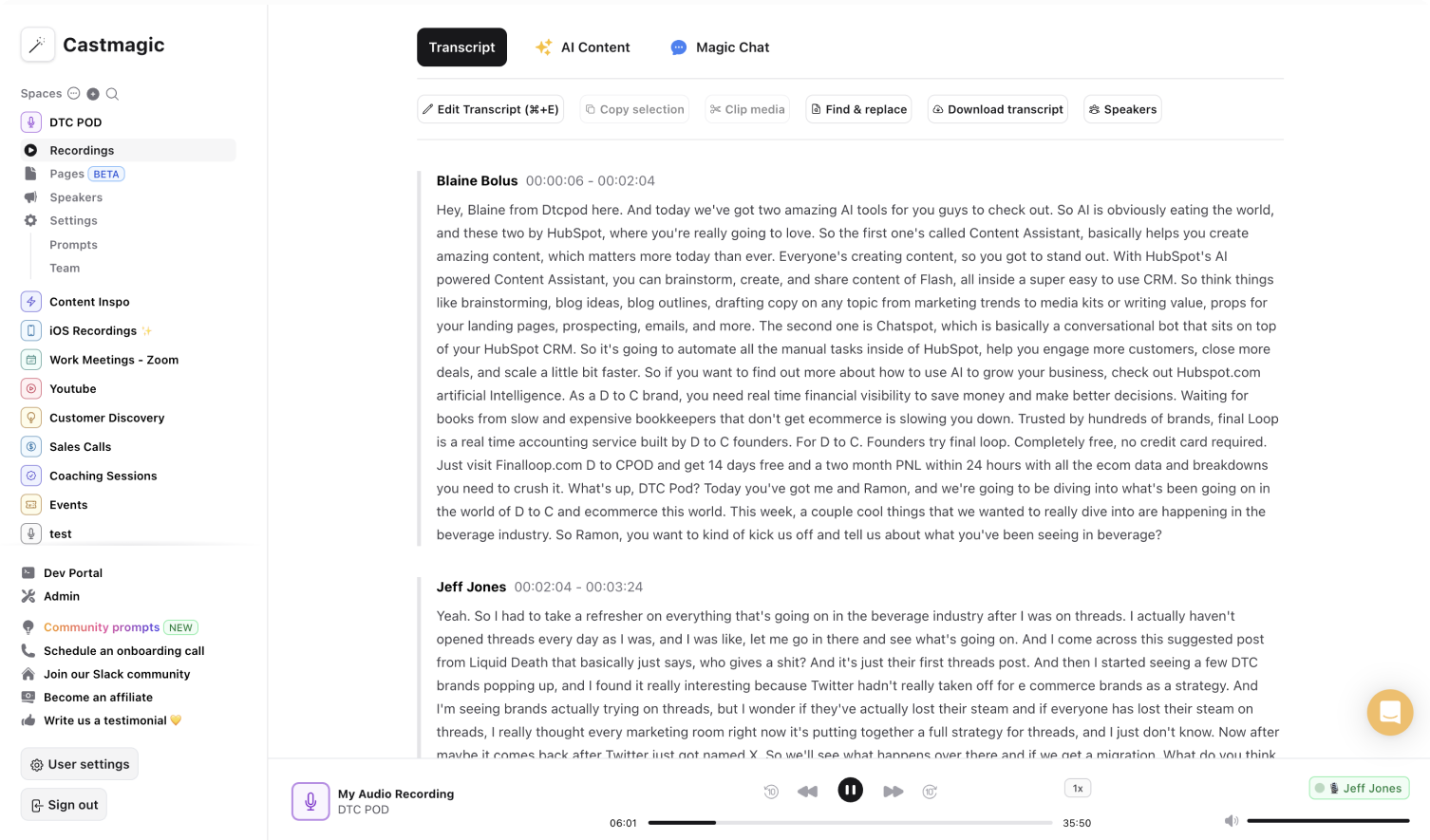
Creating written content no longer needs to be a slow, manual process. By using AI, our generator helps you generate articles quickly and efficiently, tailored to your specific needs. Whether you need a blog post, a social media update, or a detailed article, our AI writer can handle it all. Simply upload a video or audio recording and our tool will instantly transcribe it and generate the article based on the prompt and tone you ask for, complete with optimized SEO keywords and a clear outline.
One fear you might have with AI generated content is that it doesn't sound as authentic. With Castmagic, you can also adjust the tone to match your brand’s voice, whether you need a formal tone for business articles or a more conversational style for blog posts. With our AI writer, you can transform your content strategy, driving more traffic to your site and increasing your audience engagement.
The generated content isn't just about speed; it's about quality. Our AI writing assistant streamlines content creation with articles, social media posts with relevant emojis, and any other content you may need to maximize engagement. Whether you're writing articles for a website or crafting posts for social media, our tool ensures that your content stands out in a crowded digital space.
We Power The Best Creators








How To Use Castmagic for AI Article Generator

Upload Audio or Video File
Click on ‘Upload’ and select your audio or video file that you'd like to add to Castmagic. You can also drag and drop your file into the box, or import directly with your RSS link.

Transcribe Media
Label your file name, and hit 'Save Recording'’. Castmagic will automatically transcribe your file. As soon as the file is done, you'll be able to label your speakers or make any edits directly in the podcast transcript.

Download Your Transcript
While on the Transcript page, click on "download transcript" button. That's it! You'll be able to select from multiple file formats including text, SRT, VTT, CSV, and custom formats.
Edit, Optimize, and Publish with Ease
Once the AI-generated content is read, our editor allows you to make adjustments to ensure the text aligns perfectly with your brand's voice. You can easily edit, rephrase, or refine any part of the article, giving you complete control over the final product. With content generated from your audio or video recording, you can be confident that the content is relevant, original, and ready to be published.
AI Article Generator & ContentTrim and Export Your Favorite Audio & Video Clips From Your Recordings
Select your favorite parts from your recording and turn them into audio or video highlights. No extra work is necessary to transform the best parts into diverse content forms. Increase your audience reach with accessible content forms. You may have come for LinkedIn posts, but we promise you will leave with more.
Clips & AI Article GeneratorCastmagic For iOS, Record Content On the Go
Put Castmagic in your pocket. Tap to record on the go. Your recordings instantly sync with your Castmagic workspace. Capture content ideas, video sounds, or anything for your next LinkedIn post without all your tech gear. With Castmagic, recordings aren't confined to start behind the camera in the studio. Get content anytime and anywhere.
AI Article Generator with iOSEndless Content Assets In Seconds
Automate all the tedious work that comes in editing and copywriting and say hello to your new best content editor.
Integrate Content From All Your Favorite Platforms
 RSS
RSS  Zoom
Zoom  Google Drive
  Wistia
  Descript
  YouTube
  Vimeo
Vimeo  TikTok
  Instagram
  Twitch
  Loom
Loom  Zapier
 Professional Creators Love Castmagic
Castmagic is just a great product. When it came to creating content around The Calum Johnson Show it made our life a lot easier. Highly recommend

Frequently Asked Questions
Last updated June 2026 by the Castmagic team
Who is Castmagic for?
Castmagic is for podcast hosts, video streamers, or long form content creators that want to get more mileage out of their content. We make it easy to instantly turn your long form unstructured content into ready-to-use copy for shownotes, highlight clips, summaries, blogs, social posts, newsletters, and more.
How does it work?
Castmagic uses the best in class AI to turn your long form audio directly into the exact content types you need for ready to post creative.
Is there a free trial?
Yes you are entitled to a free trial to play with a few episodes and see how it works in action. If you like what Castmagic can do, we have several plans to choose from.
What languages are supported?
Castmagic transcribes in 60+ languages with automatic language detection, so you can chat with episodes recorded in most major languages, not just English.
How Do I Add Subtitles to IG Reel?
To add subtitles, you can use a tool like Castmagic to automatically transcribe the audio from your video. Once transcribed, you can easily add the text as captions to your reel.
How to get text from Instagram reels?
Simply upload the reel in audio or video format, and we will automatically convert the audio into text.
How can I make my Instagram Reels accessible for all viewers?
To make your Instagram Reels accessible for all viewers, consider adding closed captions or subtitles to convey dialogue or audio content. Additionally, use descriptive alt text when posting images to ensure accessibility for visually impaired audiences. The easiest to do this is to use a transcription service.
Discover more usecases
Explore The Castmagic Blog…

How to Become a Content Creator: a Step-By-Step Guide

Best Marketing Tools for Small Businesses in 2026

How to Do a Voice Over: Beginner Tips for Professional Sound

Can You Screen Record FaceTime Videos? What You Need to Know

How to Record Audio on iPhone: Easy Steps for Beginners

Podcast Marketing Strategies: Proven Tips for 2026

Monetizing a Podcast: What Top Creators Do to Make Money

How to Use Legit Platforms to Make Money Online Easily