Generador de audiogramas
Convierte al instante los clips de audio en contenido visual atractivo y genera recursos promocionales ilimitados. Sube tu archivo de audio o pulsa para grabar un fragmento y sincronízalo al instante con tu espacio de trabajo. Nuestro generador de audiogramas es una herramienta de creación de contenido, un editor visual y una grabadora de voz todo en uno. Convierte tu audio en audiogramas cautivadores que mejoren el alcance y el impacto de tu contenido.
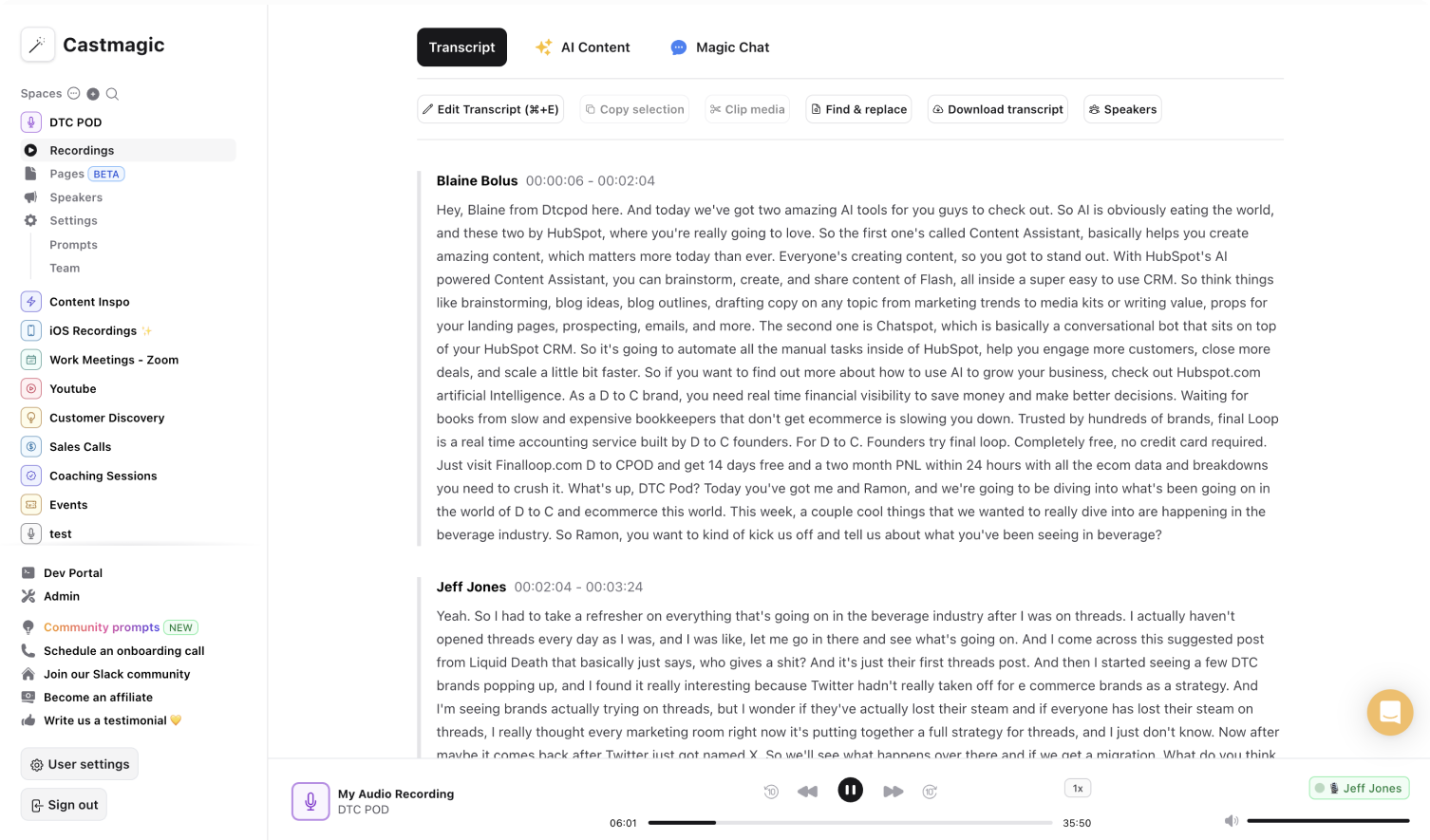

Servicio de creación de audiogramas instantáneo y seguro basado en inteligencia artificial
Crea audiogramas cargando un archivo de audio o grabando audio con tu dispositivo. Nuestro generador de audiogramas procesa tu archivo de audio al instante y genera automáticamente contenido visual dinámico que da vida a tu mensaje. Crear contenido atractivo nunca ha sido tan sencillo. No necesitas varias herramientas para grabar audio, editar y generar recursos de contenido que se puedan compartir. Nuestro objetivo con Castmagic es proporcionarte todas las herramientas que necesitas en un solo lugar para ahorrar tiempo y energía durante todo el proceso de creación de contenido.
Evita la molestia de sincronizar manualmente tus grabaciones de audio con editores visuales y otras herramientas de creación de contenido. El uso de nuestro generador de audiogramas elimina estos pasos adicionales y transforma inmediatamente sus archivos de audio en audiogramas visualmente atractivos.
Castmagic te permite crear sin limitaciones circunstanciales. Ya sea un fragmento de podcast, lo más destacado de una entrevista o un mensaje promocional, nuestra herramienta identifica los momentos clave de tu audio y los mejora con imágenes atractivas, subtítulos y mucho más. Agiliza el proceso de creación con funciones personalizables en función de tus objetivos únicos. Maximice el impacto de su contenido con aspectos destacados de audio enriquecidos visualmente con nuestra solución integral para la creación de audiogramas.
We Power The Best Creators








How To Use Castmagic for Generador de audiogramas

Tap to Record or Upload Audio/Video File
Click the record button to capture audio on the go, and capture the moment into your workspace immediately. If you have an existing audio or video file, click 'Upload' to select and add to Castmagic.

Transcribe Media
Castmagic automatically transcribes audio and video files. As soon as the transcription is done, you can label your recorded voices or make edits directly in the transcript.

Download Your Transcript
While on the Transcript page, click on "download transcript" button. That's it! You'll be able to select from multiple file formats including text, SRT, VTT, CSV, and custom formats.
Draft Content After Every Upload
Skip the hassle of manually editing or digging through your audio and video recordings to create diverse materials. Castmagic streamlines the process from recording to content creation, automatically generating audiograms ready for sharing on social media or other platforms. Let your voice recordings work for you as we convert them into eye-catching audiograms.
Generador de audiogramas & ContentExport Your Favorite Audio Clips
Our priority is to simplify every step. Select highlights from your audio recordings and transform them into captivating content. Recording and creating enriching content are no longer separate processes. Record and generate audiograms all in one place.
Clips & Generador de audiogramasCastmagic For iOS, Record On The Go
We built Castmagic to meet every need you might have with audio and content creation. Tap to record audio memos and view the automatically generated audiograms for greater impact. Our tool makes it much easier to record audio, create engaging content, and highlight major takeaways from every recording opportunity.
Generador de audiogramas with iOSEndless Content Assets In Seconds
Automate all the tedious work that comes in editing and copywriting and say hello to your new best content editor.
Integrate Content From All Your Favorite Platforms
 RSS
RSS  Zoom
Zoom  Google Drive
  Wistia
  Descript
  YouTube
  Vimeo
Vimeo  TikTok
  Instagram
  Twitch
  Loom
Loom  Zapier
 Professional Creators Love Castmagic
Castmagic is just a great product. When it came to creating content around The Calum Johnson Show it made our life a lot easier. Highly recommend

Frequently Asked Questions
Last updated June 2026 by the Castmagic team
Who is Castmagic for?
Castmagic is for podcast hosts, video streamers, or long form content creators that want to get more mileage out of their content. We make it easy to instantly turn your long form unstructured content into ready-to-use copy for shownotes, highlight clips, summaries, blogs, social posts, newsletters, and more.
How does it work?
Castmagic uses the best in class AI to turn your long form audio directly into the exact content types you need for ready to post creative.
Is there a free trial?
Yes you are entitled to a free trial to play with a few episodes and see how it works in action. If you like what Castmagic can do, we have several plans to choose from.
What languages are supported?
Castmagic transcribes in 60+ languages with automatic language detection, so you can chat with episodes recorded in most major languages, not just English.
What is an Audiogram?
An audiogram is a short video that combines audio from a podcast or other audio content with visual elements like a waveform or captions to make the audio more engaging, especially for social media.
How Long Should Podcast Audiograms Be?
Podcast audiogram length depends on the platform you’re using. For social media, the ideal length is between 30 to 60 seconds. On platforms like YouTube, audiograms can either feature the entire podcast episode or be broken down into longer segments by cutting key excerpts.
Discover more usecases
Explore The Castmagic Blog…

Las mejores herramientas de marketing de contenidos que necesitas para 2026

10 herramientas imprescindibles de YouTube para hacer crecer tu canal

Guía para crear una aplicación de podcast: funciones que necesita

El mejor generador de publicaciones de blog de IA: use la IA para crear contenido rápidamente

Cómo mejorar tu introducción a YouTube con ejemplos de introducción

El mejor generador de blogs: 6 herramientas para ahorrar horas blogueando
Descript Pricing (2026): Every Plan, What's Actually Free, and Is It Worth It?

¿Puede grabar una reunión de Zoom? Lo que necesita saber