Generador de clips de YouTube
Sube tus vídeos de YouTube a Castmagic para recortarlos y transformarlos fácilmente en clips de YouTube. Genera clips de YouTube para complementar tus vídeos de YouTube en tu canal y aumentar la presencia de tu canal en contenido de formato largo y corto. Otros editores de vídeo dan prioridad al proceso antes de subir vídeos a YouTube. No son muchos los que se centran en el proceso después de subirlos. Nuestro objetivo es permitirte publicar contenido diverso en tu canal con un editor de vídeo que recorte tus vídeos de YouTube para que queden destacados a partir de información basada en la inteligencia artificial. Estos clips de YouTube pueden impulsar tu canal y ampliar tu audiencia. Accede a la rica biblioteca de contenido que puedes crear cargando y transcribiendo tus vídeos de YouTube, como clips de vídeo de YouTube, miniaturas, iconos, cronología de vídeos de YouTube, fragmentos de vídeo, publicaciones en redes sociales, marcas de tiempo, palabras clave y mucho más.
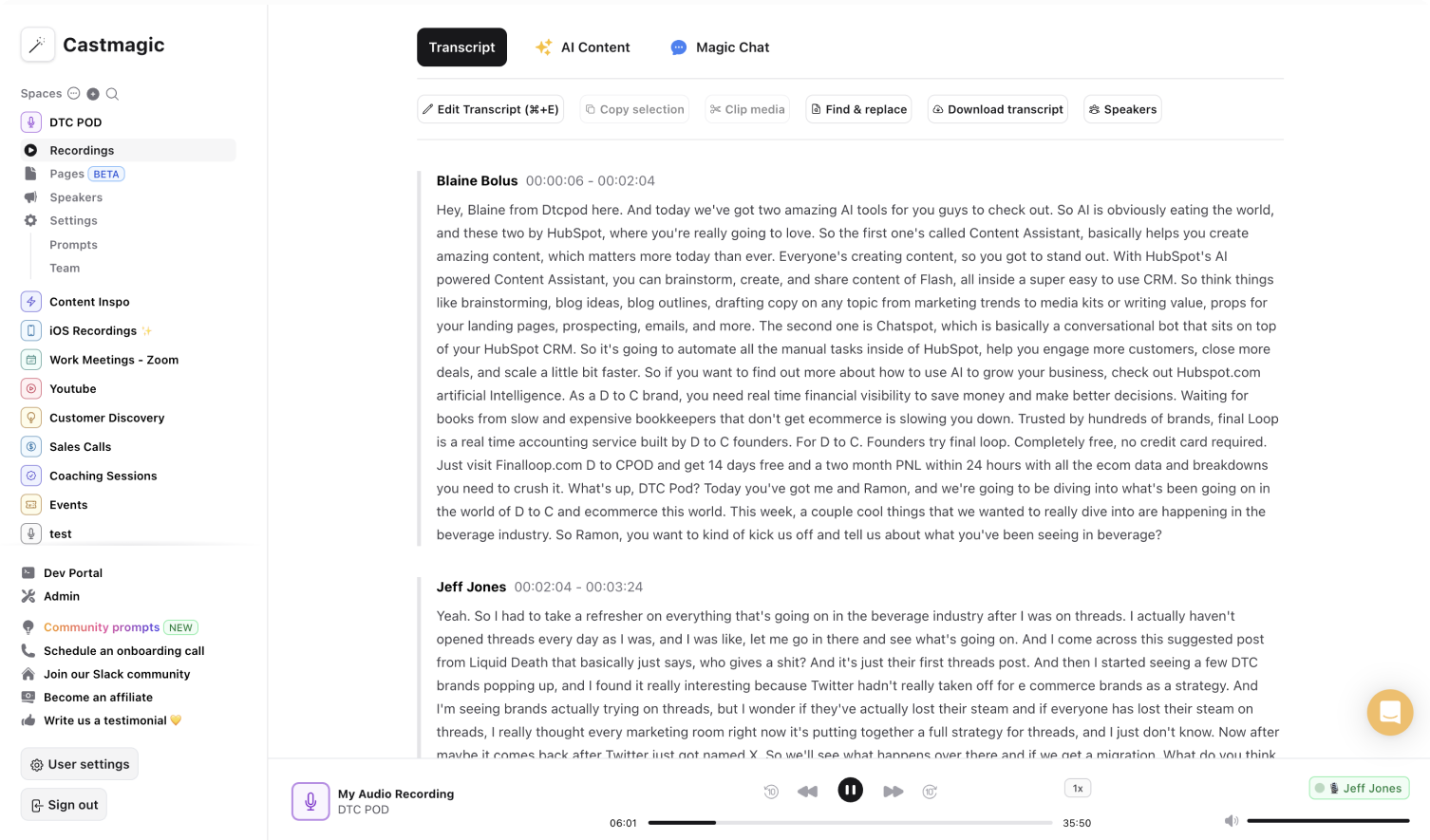

Transcripciones de IA instantáneas, seguras y automáticas para YouTube
Castmagic maximiza el impacto de cada vídeo de YouTube sin sacrificar tiempo ni energía. Nuestro objetivo es ayudar durante todo el proceso, desde subir tu vídeo de YouTube hasta acceder y editar la transcripción del vídeo de YouTube, y utilizar la transcripción del vídeo de YouTube para crear diversos videoclips de YouTube y otro contenido para tu canal. Todo lo que tienes que hacer es concentrarte en filmar, editar vídeos y subir tu vídeo final a YouTube. Transformamos automáticamente tu vídeo de YouTube en clips de YouTube y generamos contenido a partir de la transcripción, como miniaturas, palabras clave de los vídeos de YouTube, títulos, descripciones, marcas de tiempo, preguntas, subtítulos opcionales y mucho más para aumentar la visibilidad y la participación.
Transformamos cada transcripción de YouTube en una variedad de recursos entre los que puede elegir. Cada transcripción de vídeo de YouTube contiene la posibilidad de incluir un número ilimitado de recomendaciones y piezas de contenido. No pierdas el tiempo transcribiendo manualmente tus vídeos de YouTube para crear contenido y aumentar la accesibilidad, y dedica más tiempo a lo que realmente importa: hacer una lluvia de ideas y capturar vídeos de YouTube cautivadores que atraigan a tus suscriptores.
Los clips de YouTube capturan lo más destacado de tus vídeos de YouTube para atraer a espectadores nuevos y existentes a tu canal. La transformación instantánea de los vídeos de YouTube en clips de vídeo de YouTube potencia tu canal de forma sencilla pero muy eficaz. Otros editores de vídeo hacen precisamente eso: editar vídeos. Castmagic te ofrece herramientas para editar la transcripción de vídeos de YouTube para aprovechar al máximo tus vídeos de YouTube y obtener contenido intuitivo y videoclips de YouTube.
We Power The Best Creators








How To Use Castmagic for Generador de clips de YouTube

Upload Your Video File or Paste YouTube URL
Click on ‘Upload’ and select your YouTube video file that you'd like to add to Castmagic. You can also drag and drop your file into the box, or import directly with your YouTube link.

Transcribe Media
Label your file name, and hit 'Save Recording'’. Castmagic will automatically transcribe your file. As soon as the file is done, you'll be able to label your speakers or make any edits directly in the transcript.

Download Your YouTube Transcript
While on the Transcript page, click on "download transcript" button. That's it! You'll be able to select from multiple file formats including text, SRT, VTT, CSV, and custom formats.
Upload Content Across Multiple Platforms Instantly
Expand your audience reach by diversifying your content formats. YouTube videos don't have to just stay as YouTube videos. Instead download YouTube videos for Castmagic to instantly convert them into shareable content as video clips and trimmed versions that are more accessible and fitting for the short-form content trend. Only do work once. No need to create YouTube videos to only create other video clips.
Generador de clips de YouTube & ContentTrim and Export Your Favorite Audio & Video Clips From Your YouTube Videos
YouTubers expand into multiple platforms to keep up within the influx of creators in the past few years. This normally requires YouTubers to brainstorm, film, and upload YouTube videos. Then repeat the entire process for video clips or short form content. With Castmagic, no extra work is necessary to transform the highlight clips from the YouTube video you worked hard on into other content forms. We convert moments from you YouTube video into audio or video highlights. Skip the hassle of using a video editor to trim YouTube videos into highlight clips.
Clips & Generador de clips de YouTubeCastmagic For iOS, Record Youtube Content On the Go
Put Castmagic in your pocket. Tap to record on the go. Your recordings instantly sync with your Castmagic workspace. Capture content ideas, video sounds, or anything YouTube related without all your tech gear. With Castmagic, YouTube videos aren't confined to start behind the camera in the studio. Get YouTube content anytime and anywhere.
Generador de clips de YouTube with iOSEndless Content Assets In Seconds
Automate all the tedious work that comes in editing and copywriting and say hello to your new best content editor.
Integrate Content From All Your Favorite Platforms
 RSS
RSS  Zoom
Zoom  Google Drive
  Wistia
  Descript
  YouTube
  Vimeo
Vimeo  TikTok
  Instagram
  Twitch
  Loom
Loom  Zapier
 Professional Creators Love Castmagic
Castmagic is just a great product. When it came to creating content around The Calum Johnson Show it made our life a lot easier. Highly recommend

Frequently Asked Questions
Last updated June 2026 by the Castmagic team
Who is Castmagic for?
Castmagic is for podcast hosts, video streamers, or long form content creators that want to get more mileage out of their content. We make it easy to instantly turn your long form unstructured content into ready-to-use copy for shownotes, highlight clips, summaries, blogs, social posts, newsletters, and more.
How does it work?
Castmagic uses the best in class AI to turn your long form audio directly into the exact content types you need for ready to post creative.
Is there a free trial?
Yes you are entitled to a free trial to play with a few episodes and see how it works in action. If you like what Castmagic can do, we have several plans to choose from.
What languages are supported?
Castmagic transcribes in 60+ languages with automatic language detection, so you can chat with episodes recorded in most major languages, not just English.
What Is a Youtube Clipper
A YouTube clipper is a tool that helps you cut longer YouTube videos into clips. Castmagic’s clipper uses AI to make it easy to create shareable content without needing video editing tools.
Can You Cut a Clip from a Youtube Video?
Yes, you can cut a clip from a YouTube video using tools like Castmagic's YouTube Clipper. It lets you easily trim longer videos into shorter highlights using AI.
Discover more usecases
Explore The Castmagic Blog…
Monetizar un podcast: qué hacen los mejores creadores para ganar dinero

El mejor generador de blogs: 6 herramientas para ahorrar horas blogueando
5 Best Fireflies.ai Alternatives in 2026 (Free and Paid)

Las mejores herramientas de SEO: cuáles son las mejores herramientas de SEO para el ranking de sitios web

Cómo recortar un vídeo de YouTube: guía sencilla para fragmentos

La guía no autorizada para descargar audio de sitios web
7 Best Descript Alternatives for 2026

¿Cuál es la mejor manera de extraer el audio de un vídeo?