

YouTube Description Examples for More Views & Subs
For every successful YouTube channel, there’s hundreds, if not thousands, of unsuccessful ones. The biggest reasons for a lack of success come down to three things - bad titles, bad thumbnails, and horrible (or nonexistent!) YouTube descriptions. In this post, we’ll explore YouTube descriptions and why they are so important to get right if you hope to have a successful channel.
In our opinion, YouTube descriptions are a crucial yet often overlooked element of content creation, and we think it’s a huge opportunity for YouTube channels looking to get the upper edge. Whether you're crafting a channel bio or writing up details for your latest short video, a well-written description can boost your visibility and engage viewers. Let’s dive into what you need to know to improve your YouTube description game!
Understanding YouTube Description
The not so exciting answer to “What is a YouTube description?” is that it’s a text field that provides additional information about your video or YouTube channel.
The more exciting answer? The YouTube description for your channel or your individual videos are the proverbial keys to the YouTube kingdom, er algorithm.
Your YouTube description can help the YouTube algorithm understand and categorize your content. A well-crafted description that is search engine optimized can improve your video's visibility in search results and suggested videos.
The result? It could potentially increase views and engagement.
There are two main types of YouTube descriptions: channel descriptions and video descriptions. A channel description, found on your channel's "About" page, gives an overview of your content and brand. It helps potential subscribers understand what your YouTube channel is about and why they should follow you. Video descriptions, on the other hand, provide specific details about individual videos, including summaries, timestamps, and links to related content.
YouTube allows up to 5,000 characters for video descriptions, giving you ample space to provide detailed information. However, only the first 100-150 characters appear in search results and above the "Show more" button on mobile devices. For channel descriptions, you have a 1,000 character limit. It's crucial to make the most of these initial characters to grab the attention of potential viewers, and convey key information.
When writing a good YouTube description, aim for a length that balances thoroughness with readability. For video descriptions, 200-300 words is often sufficient to provide context without overwhelming viewers. YouTube channel descriptions can be shorter, typically around 100-150 words, focusing on your channel's main themes and unique value proposition.
YouTube Bio: Adding Personality to Your Channel Description
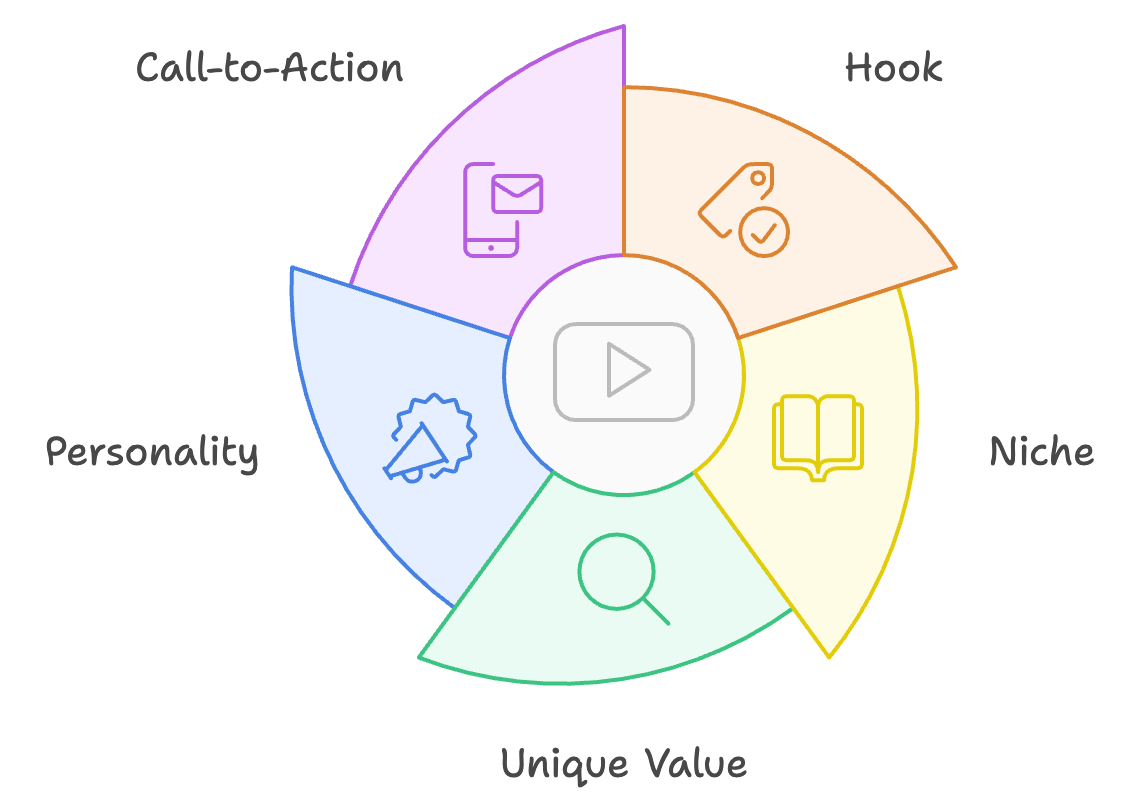
Your YouTube bio, or channel description, is your chance to make a strong first impression on potential subscribers. A compelling bio should clearly communicate what your channel is about, showcase your personality, and give viewers a reason to subscribe. Here's how to write an effective YouTube channel description:
1. Start with a hook: Begin with an attention-grabbing statement or question that encapsulates your channel's essence.
2. Clearly state your niche: Explain what type of content you create and what topics you cover.
3. Highlight your unique value: What makes your channel different from others in your niche?
4. Show your personality: Use language that reflects your brand voice and gives viewers a sense of who you are.
5. Include a call-to-action: Encourage viewers to subscribe or check out your latest videos.
Here's an example of a successful YouTube bio:
"Welcome to TechTips101! 🚀 Confused by the ever-changing world of technology? You're in the right place! I break down complex tech concepts into bite-sized, easy-to-understand videos. From smartphone hacks to coding basics, we cover it all. New videos every Wednesday and Saturday. Hit subscribe and never miss a tech tip again!"
This bio effectively communicates the channel's focus (tech tips), unique value (making complex topics easy to understand), posting schedule, and includes a clear call-to-action.
To show personality and brand values in a concise bio, use your authentic voice. If your brand is playful, include emojis or casual language. If you're more professional, stick to a polished tone. Share a brief personal anecdote or mission statement to connect with viewers on a deeper level.
Essentials of a Successful YouTube Description
An effective YouTube description, whether for a channel or individual video, should include several key components:
1. Keywords: Include relevant keywords naturally throughout your description to improve SEO.
2. Summary: Provide a brief overview of your video or channel content.
3. Timestamps (for videos): Help viewers navigate longer videos by including timestamps for different sections.
4. Links: Include relevant links to your website, social media, or related content.
5. Call-to-action: Encourage viewers to like, comment, subscribe, or take other desired actions.
YouTube SEO 101
How can you write engaging descriptions that are optimized for YouTube SEO?
First and most importantly, you should front-load important information. This means putting the most crucial details in the first 100-150 characters.
Next, use natural language. Write for humans first, algorithms second.
Pro Tip: Avoid keyword stuffing.
This can actually get your videos and even your channel banned if YouTube suspects you of this.
Your YouTube descriptions should also be, well, descriptive! Give viewers a specific and clear idea of what to expect from your content.
It’s also a good idea to update your descriptions regularly. Keep your channel description current and refresh YouTube video descriptions as needed.
YouTube Video Description Example
"In this tutorial, we'll walk through how to create a responsive website using HTML and CSS. Perfect for beginners!
🕒 Timestamps:
0:00 Introduction
1:30 Setting up your HTML structure
5:45 Adding CSS for responsiveness
12:30 Testing on different devices
18:00 Final touches and tips
👉 Download the code: [link]
👉 Join our web dev community: [link]
Don't forget to like and subscribe for more coding tutorials every week!"
This description includes keywords, a summary, timestamps, relevant links, and a call-to-action, making it both user-friendly and optimized for search.
YouTube Description Template: A Formula for Success

Creating and/or using a YouTube description template can save time and ensure consistency across your videos. A template serves as a starting point, which you can customize for each video while maintaining a recognizable structure. Here are some template examples for different types of content:
YouTube Video Tutorial Description Template:
"In this video, we'll be [describe the task].
You'll learn:
• [Key point 1]
• [Key point 2]
• [Key point 3]
🕒 Timestamps:
[Include relevant timestamps]
Resources mentioned:
[List any tools, websites, or products discussed]
Subscribe for more [your niche] tutorials every [day of the week]!"
YouTube Vlog Description Template:
"Join me as I [describe the vlog's main activity or theme].
In this vlog:
• [Highlight 1]
• [Highlight 2]
• [Highlight 3]
🔗 Connect with me:
Instagram: [link]
Twitter: [link]
Website: [link]
New vlogs every [day of the week]. Hit subscribe so you don't miss out!"
YouTube Product Review Video Description Template:
"Today we're reviewing the [Product Name]. Is it worth your money? Watch to find out!
Key points covered:
• Features and specs
• Pros and cons
• Price and value for money
• Final verdict
📢 Have you tried this product? Let me know your thoughts in the comments!
For more honest reviews, subscribe to the channel and hit the notification bell."
How to Customize Templates for Your YouTube Videos & Channel
These templates are of course, quite generic. You should customize them to fit the needs of your unique channel. Here are some ideas for how to do just that:
1. Adjust the language to match your brand voice.
2. Add or remove sections based on your specific content.
3. Include your unique sign-off or catchphrase.
4. Tailor the call-to-action to your current goals (e.g., increasing subscribers, promoting a specific video series).
When creating video content, templates are a wonderful way to generate consistency in your YouTube videos. However, while templates provide a helpful structure, it's important to customize each description to accurately reflect the specific content of your video. This ensures that your descriptions remain relevant and helpful to both viewers and search algorithms.
Related: Read "How To Make A YouTube Video: 17 Tips For Beginners"
Create Better YouTube Descriptions with Castmagic
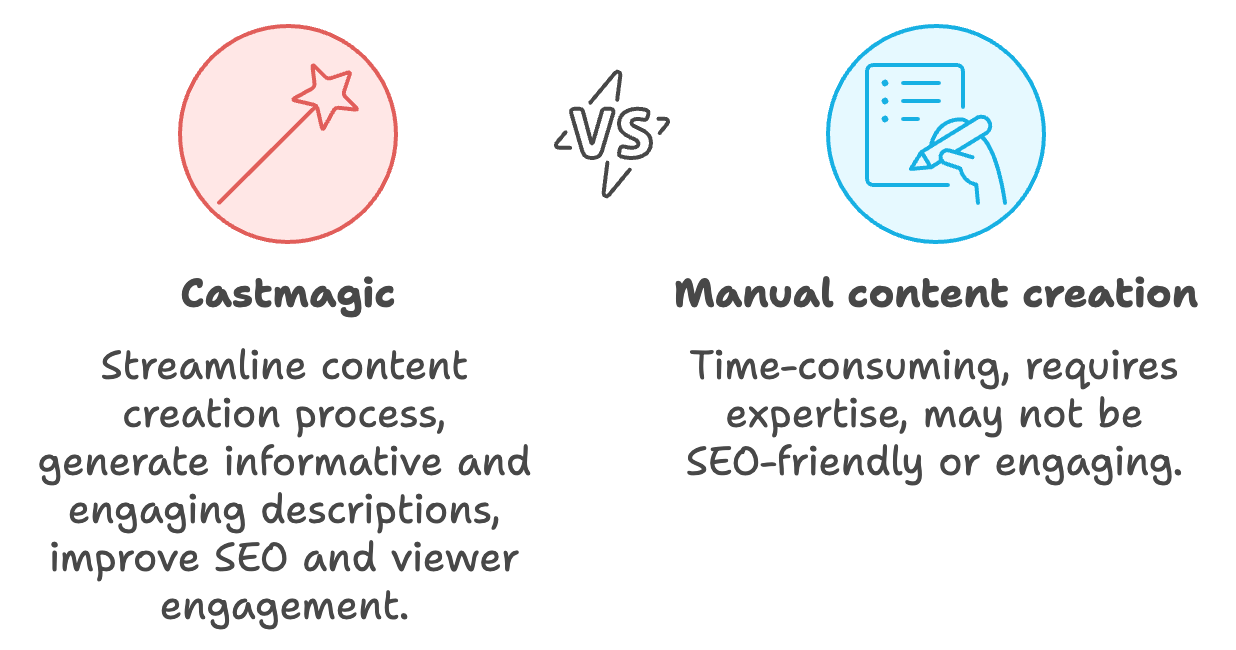
Castmagic is an all-in-one transcription and AI-content platform designed to assist content creators and businesses in generating various types of content, including YouTube descriptions.
Upload your video or share the URL of the video that you've already uploaded to YouTube Studio with the Castmagic platform and it can help you with a plethora of content that could improve your YouTube channel’s odds of success.
1. Automated Transcription:
Castmagic offers transcription services with speaker diarization for English and 17 additional languages. This can help you create accurate, detailed descriptions based on your video's content.
2. Content Generation:
The platform is developing intelligent content production capabilities for transcripts. This AI-powered feature could help generate compelling descriptions based on your video's content.
3. Timestamps:
Castmagic can create timestamps for your videos, which are crucial for longer content. These can be included in your YouTube description to help viewers navigate your video more easily.
4. Keywords and Titles:
The platform offers tools to generate titles and keywords, which are essential for optimizing your YouTube descriptions for search.
5. Episode Q&A:
This feature could help you create a summary or Q&A section for your video description, making it more informative and engaging.
6. Clip Finder & Quotes:
Castmagic can identify key moments and quotes from your content, which you can highlight in your description to entice viewers.
7. Multiple Content Outputs:
The platform generates various content types like show introductions, speaker bios, and even 2000+ word articles. These can be repurposed for comprehensive and engaging YouTube descriptions.
8. Customization:
Castmagic allows for custom prompts, enabling you to tailor the generated content to your specific needs and style.
By leveraging these features, Castmagic can significantly streamline the process of creating informative, SEO-friendly, and engaging YouTube descriptions, potentially improving your channel's performance and viewer engagement.
Best Practices for YouTube Shorts Descriptions
YouTube Shorts have taken the platform by storm, offering creators a new way to engage audiences with bite-sized content. When it comes to descriptions for Shorts, you'll need to adapt your approach:
Character Limitations
YouTube Shorts descriptions are limited to 100 characters. This brevity means you need to be concise and impactful with your words.
Maximizing Limited Space
• Focus on one main keyword or phrase
• Use eye-catching emojis to break up text
• Include a clear call-to-action (CTA)
Example of an effective Shorts description:
"🔥 5 Quick Workout Tips | Try these at home! 💪 #FitnessShorts #QuickWorkout"
Keyword Research Tips for YouTube

Effective keyword research is crucial for optimizing your YouTube descriptions. Here are some strategies to find the right keywords:
YouTube Autocomplete
Start typing potential keywords in YouTube's search bar. The autocomplete suggestions are based on popular searches, giving you insights into what viewers are looking for.
Google Keyword Planner
While primarily for Google searches, this tool can also provide valuable data for YouTube keywords. Look for keywords with high search volume and low competition.
YouTube-Specific Tools
Consider using tools like TubeBuddy or vidIQ, which offer YouTube-specific keyword research features.
Analyze Competitor Descriptions
Look at the descriptions of successful videos in your niche. What keywords are they using? This can give you ideas for your own content.
Localization Strategies for International Audiences
If you're targeting a global audience, consider these strategies for your YouTube descriptions:
Translate Your Descriptions
Provide translations of your descriptions in the languages of your target audiences. This can significantly increase your reach.
Use Local Keywords
Research and use keywords that are popular in specific regions. For example, "soccer" in the US might be "football" in the UK.
Cultural Sensitivity
Be aware of cultural differences when writing descriptions. What works in one country might not resonate in another.
Geotargeting
YouTube allows you to create different versions of your video for different geographic locations. Take advantage of this to customize your descriptions for specific regions.
Hashtag Usage in YouTube Descriptions
Hashtags can be a powerful tool for categorizing your content and improving discoverability. Think of it as effortless marketing for your YouTube channel. Here's how to use them effectively:
Placement
YouTube allows you to add hashtags in your video title and description. The first three hashtags from your description will appear above your video title.
Relevance is Key
Use hashtags that are directly related to your content. Irrelevant hashtags can confuse viewers and potentially violate YouTube's policies.
Don't Overdo It
YouTube recommends using no more than 15 hashtags per video. Using too many can look spammy and dilute the effectiveness of your primary tags.
Create Branded Hashtags
Consider creating a unique hashtag for your channel or video series to build brand recognition and community.
Research Popular Hashtags
Look at what hashtags are being used in popular videos in your niche for ideas.
Mobile Optimization for YouTube Descriptions
With more than 70% of YouTube watch time coming from mobile devices, it's crucial to optimize your descriptions for mobile viewers:
Front-Load Important Information
Mobile users typically see even less of your description before the "Show more" button. Make sure your most crucial information is in the first sentence or two.
Use Short Paragraphs
Long blocks of text are hard to read on mobile screens. Break up your description into short, easily digestible paragraphs.
Optimize Link Placement
If you're including links, consider putting the most important ones near the top of your description for easy mobile access.
Use Mobile-Friendly Formatting
Utilize line breaks, emojis, and simple formatting to make your description easy to scan on small screens.
Test on Multiple Devices
Before finalizing your description, view it on various mobile devices to ensure it looks good and functions as intended across different screen sizes.
Common Mistakes to Avoid in YouTube Descriptions
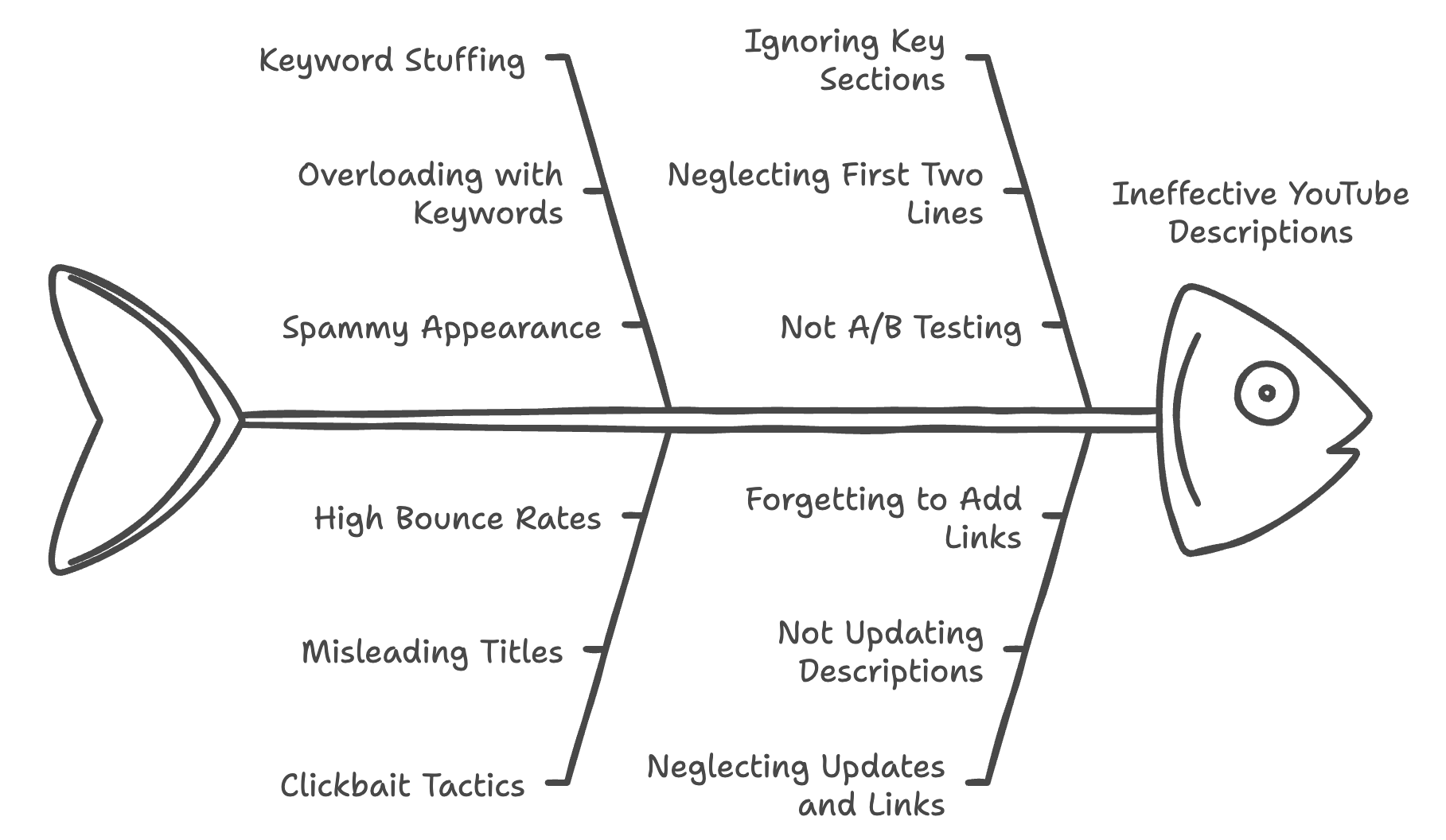
Steer clear of these pitfalls to ensure your descriptions are effective and align with YouTube's best practices:
Keyword Stuffing
Don't overload your description with keywords. This can come across as spammy and may actually hurt your rankings.
Clickbait Tactics
Avoid misleading titles or descriptions that don't accurately reflect your content. This can lead to high bounce rates and negatively impact your channel.
Ignoring the First Two Lines
Remember, only the first couple of lines are visible before viewers have to click "Show more." Make these count!
Pro Tip: Look at your videos on mobile devices and in different browsers to see how your description appears.
This way, if you feel it needs to be updated you can make changes.
You can also A/B test descriptions and see how they perform
Neglecting to Update
As your content evolves, make sure to update your channel description to reflect current themes and offerings.
Forgetting to Add Links
Missing out on opportunities to drive traffic to your website or social media by forgetting to include relevant links.
Not Using Castmagic
Castmagic can save you significant time in crafting detailed, SEO-optimized YouTube descriptions. And, using a tool like Castmagic can help maintain consistency across your video descriptions, which is beneficial for branding and viewer experience.
Want to try Castmagic for yourself and start creating better YouTube descriptions with ease? Click here and unlock all the bells and whistles it has to offer!
More blogs like this

Best Marketing Tools for Small Businesses in 2026
We've seen countless small businesses transform their marketing efforts simply by choosing smart, efficient solutions that work for their specific needs. The truth is, with the best marketing tools for small business success, you can automate repetitive tasks, reach more customers, and finally get that marketing strategy off your never-ending to-do list.

How to Do a Voice Over: Beginner Tips for Professional Sound
Ever wondered why some voiceovers make you stop scrolling while others make you hit skip faster than you can say "subscribe"? The simple fact is, viewers are far more likely to abandon a video with poor audio quality than one with lower-quality visuals. Yep - you read that correctly. Your voice and audio matter more than your fancy camera!

Can You Record a Zoom Meeting: What You Need to Know
Let's dive into everything you need to know about recording in the Zoom web portal. We'll walk you through the built-in features, explore your options as both host and participant, tackle the legal stuff you can't ignore, and share some pro tips to make your recordings actually useful. Let's get started!

Guide to Creating a Podcast App: Features You Need
Whether you're targeting content creators looking for better monetization tools or audiences seeking personalized recommendations, the features you choose will make or break your app's success. In this quick and easy guide, we're diving deep into everything you need to know about creating a podcast app that stands out today. From must-have functionalities to advanced features that'll set you apart, we've got you covered!
Best Discussion Post Generator: Let AI Research for You
Studies show that companies implementing AI solutions have experienced a huge increase in productivity and an improvement in overall satisfaction. That's transformative! And now, these same AI technologies are revolutionizing how we approach discussion posts, transforming what used to be a time-consuming struggle into an efficient, research-backed process.
6 Best OpusClip Alternatives in 2026 (Free and Paid)
Looking for an OpusClip alternative? Here are the 6 best, sorted by the job you need done: clips plus full content from one upload, cheaper clipping, captions, or hands-on editing.
How to Record Google Meet: Save and Share Your Calls
In this guide, we'll walk you through everything you need to know about recording Google Meet calls—from understanding requirements and permissions to mastering the recording process on different devices and maximizing the value of your recordings!

How to Use AI Podcast Show Notes to Grow Your Show
What should take 30 minutes somehow stretches into two hours as you struggle to capture the essence of your conversation, identify key timestamps, and craft something that will actually help people discover your show. Sound familiar? Here's the thing though, search engines can't listen to your audio content. They rely entirely on text to understand what your episodes are about.
ChatGPT Alternatives: Best Free AI Tools for 2026
Whether you're a content creator needing specialized writing assistance, a developer seeking coding support, or a researcher requiring current data with proper citations, there's an AI chatbot perfectly suited to your needs. In this guide, we're looking at the top AI tools available in 2026, examining their standout features, and helping you discover which ChatGPT alternative will transform how you work.