
Zoom Transcription
Instantly repurpose your Zoom recordings into every content asset you can imagine: from Zoom meeting notes, to live captions, timestamps, agendas, action items, follow-up plans, feedback form, and more.
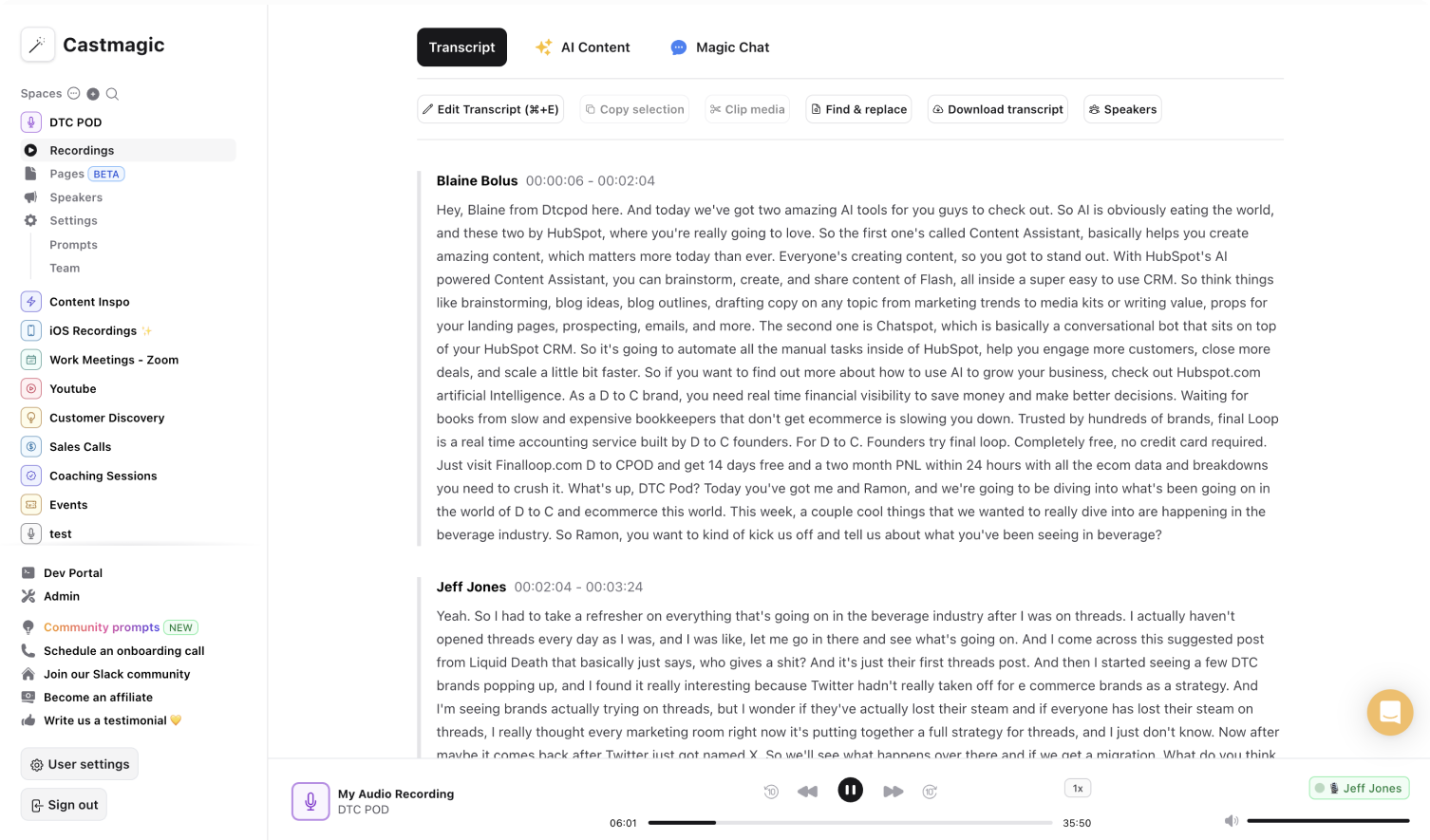

Instant & Secure AI-Transcriptions using Zoom Recordings
A lot of time is required to send calendar invites to attendees, plan Zoom meetings, write the Zoom meeting agenda, access the Zoom recorded meetings/Zoom webinars in the Zoom Cloud, and transcribe Zoom recordings from speech to text. It's not easy to manually transcribe the Zoom meetings or webinars to curate actionable materials. We built Castmagic to streamline the entire transcription process and make it easy for you to transform your Zoom meetings/webinars into diverse content asset. Castmagic acts as video and audio transcription service, subtitle generator, closed captioning generator, and more with our automatic AI transcription feature.
Upload audio files or video files of Zoom meetings/webinars into Castmagic, and let us transcribe the Zoom recordings empowering you to analyze the video or audio transcripts and identify the highlights. Utilize our customizable tools to change tones and prompts based on your unique objectives. Our customizable tools enables you to save time from manually transcribing Zoom meetings/Zoom webinars, create meeting notes / meeting minutes using the Zoom transcriptions, and automatically add live captions to the recorded Zoom meeting/webinars for greater accessibility.
Reallocate the time and effort you currently expend to transcribe Zoom meeting recordings, add closed captions, and curate materials like meeting notes, timestamps, subtitles, agendas, etc. as we do it for you.
We Power The Best Creators








How To Use Castmagic for Zoom Transcription

Upload Zoom Audio or Video File
Click on ‘Upload’ and select your audio file or video file that you'd like to add to Castmagic. You can also drag and drop your file into the box.

Transcribe Media
Label your file name, and hit 'Save Recording'’. Castmagic will automatically transcribe your file. As soon as the file is done, you'll be able to label your speakers or make any edits directly in the transcript.

Download Your Transcript
While on the Transcript page, click on "download transcript" button. That's it! You'll be able to select from multiple file formats including text, SRT, VTT, CSV, and custom formats.
Draft Content After Every Virtual Meeting/Video Conferencing
Skip the hassle of rewatching Zoom meetings to ensure key points and action items are incorporated into post-meeting materials. Castmagic automatically transcribes Zoom recordings and generates insightful content tailored for various teams after every meeting. You can listen to Zoom meetings just once, upload Zoom meeting recording as a video file or audio file, and easily create comprehensive and customizable materials to share with cross-functional teams.
Zoom Transcription & ContentExport Your Fav Audio & Video Clips From Zoom Calls/Webinars
Select the notable meeting points from Zoom transcriptions and turn them into audio or video highlights. No extra work necessary to transform the Zoom video recording highlights into different content forms. Upload the video recordings from your Zoom account, and we transcribe them to easily create diverse, searchable, and accessible content.
Clips & Zoom TranscriptionCastmagic For iOS, Record On The Go
Put Castmagic in your pocket, tap to record, and instantly sync with the workspace. Record spontaneously for audio content to share during your virtual meetings. Access your audio recording immediately within your Castmagic workspace. By the time the video conferencing starts, your audio recording will already be transcribed from speech to text. Take advantage of every scheduled and unscheduled transcript opportunity.
Zoom Transcription with iOSEndless Content Assets In Seconds
Automate all the tedious work that comes in editing and copywriting and say hello to your new best content editor.
Integrate Content From All Your Favorite Platforms
 RSS
RSS  Zoom
Zoom  Google Drive
  Wistia
  Descript
  YouTube
  Vimeo
Vimeo  TikTok
  Instagram
  Twitch
  Loom
Loom  Zapier
 Professional Creators Love Castmagic
Castmagic is just a great product. When it came to creating content around The Calum Johnson Show it made our life a lot easier. Highly recommend

Frequently Asked Questions
Last updated June 2026 by the Castmagic team
Who is Castmagic for?
Castmagic is for podcast hosts, video streamers, or long form content creators that want to get more mileage out of their content. We make it easy to instantly turn your long form unstructured content into ready-to-use copy for shownotes, highlight clips, summaries, blogs, social posts, newsletters, and more.
How does it work?
Castmagic uses the best in class AI to turn your long form audio directly into the exact content types you need for ready to post creative.
Is there a free trial?
Yes you are entitled to a free trial to play with a few episodes and see how it works in action. If you like what Castmagic can do, we have several plans to choose from.
What languages are supported?
Castmagic transcribes in 60+ languages with automatic language detection, so you can chat with episodes recorded in most major languages, not just English.
Discover more usecases
Explore The Castmagic Blog…

How to Record Google Meet: Save and Share Your Calls

Best Transcription Software for Podcasters: Save Time with AI Tools

The Unauthorized Guide to Downloading Audio from Websites

How to Make a Slideshow on TikTok: Step-by-Step Guide

Best Discussion Post Generator: Let AI Research for You

How to Use Sales Call Analysis Software to Earn More Revenue

Best Instagram Caption Generator: Paid and Free AI Tools

Podcast Background Ideas: Quick Tips for Stunning Videos
