Coaching Session Transcription
Maximize coaching impact with effortless coaching content creation: from meeting templates to worksheets, agenda templates, direct reports, social media posts, follow-up emails, meeting agendas, action items, and more.
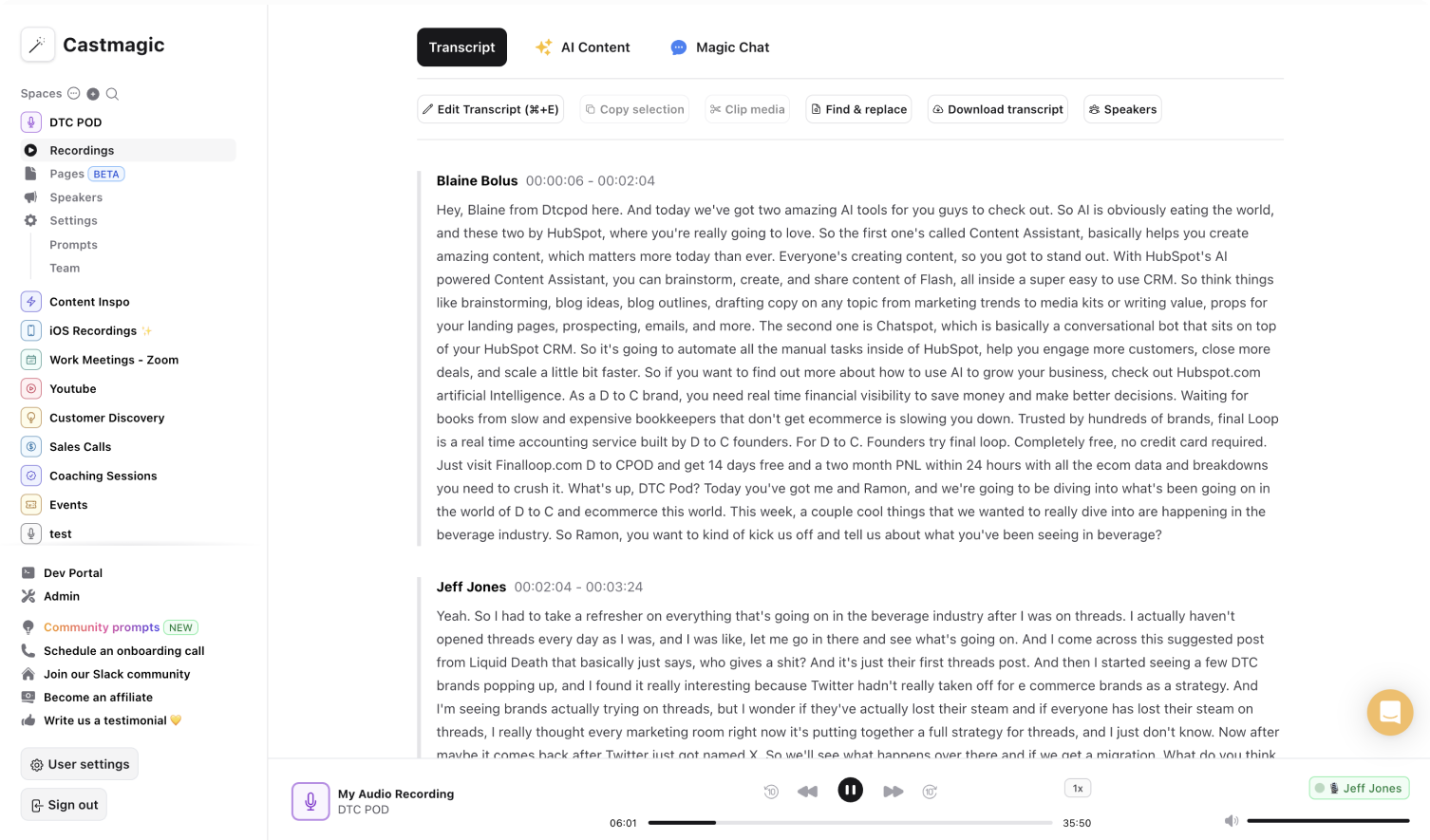

Instant & Secure AI-Transcriptions to Maximize Coaching Sessions
Castmagic makes it easy to plan one on one coaching sessions with customizable meeting templates and agenda templates. From planning to extracting valuable assets from your sessions, our goal is to empower you throughout the entire process. Eliminate frantic note-taking during your meetings and transcription post-meetings to identify action items for every client. Instead, focus your energy to build rapport with you clients and convert one meeting to multiple using automated insights from your session recordings. Generate personalized feedback, goals, meeting agenda follow-ups, and action items–all with minimal effort. Whether you're reviewing your clients' professional goals or career development process, Castmagic equips you with the tools to successfully encourage your clients.
Moreover, we understand that no two clients are alike. Castmagic offers customization options to tailor the coaching experience to each client's needs. You can add custom prompts and integrate specific strategies, fostering deeper engagement with personalized meeting agendas, action items, and career development feedback for more effective one on one sessions. Castmagic simplifies content extraction and creation saving you time and energy from manually curating post-session materials, allowing you to spend more time and energy to build rapport, optimize goal setting and feedback, and curate meeting templates that work. Maximize the effectiveness and impact of every coaching agenda and session with less effort.
We Power The Best Creators








How To Use Castmagic for Coaching Session Transcription

Upload Audio or Video File of Your Coaching Session
Click on ‘Upload’ and select your audio or video file that you'd like to add to Castmagic. You can also drag and drop your file into the box, or import directly with your RSS link..

Transcribe Media
Label your file name, and hit 'Save Recording'’. Castmagic will automatically transcribe your file. As soon as the file is done, you'll be able to label your speakers or make any edits directly in the transcript.

Download Your Transcript
While on the Transcript page, click on "download transcript" button. That's it! You'll be able to select from multiple file formats including text, SRT, VTT, CSV, and custom formats.
Draft Unique Coaching Materials for Each Client
Create meeting agendas, action items, and goal setting principles uniquely tailored for each client. From checking off items from the meeting agenda to giving feedback based on session insights, Castmagic optimizes every one on one session for greater success. Expand your audience reach by diversifying your content formats, and schedule more one on one sessions to define productive action items for more people. Curate customized meeting templates and career development resources to empower diverse clients reach their goals without spending extra time or effort.
Coaching Session Transcription & ContentExport Your Favorite Audio & Video Clips From Different Coaching Sessions
Transform your favorite session quotes into audio or video highlights for more coaching leads. Showcase the unique thoughts and value that you provide as you reinforce your online brand presence. Increase your audience reach with more accessible and digestible content.
Clips & Coaching Session TranscriptionCastmagic For iOS, Record Coaching Sessions Anytime
Put Castmagic in your pocket. Tap to record and instantly sync with your workspace. With Castmagic, coaching sessions aren't confined to the office. Motivate your clients in-person, outside—wherever and whenever. With a simple tap, capture coaching sessions and inspiration to build coaching assets anytime.
Coaching Session Transcription with iOSEndless Content Assets In Seconds
Automate all the tedious work that comes in editing and copywriting and say hello to your new best content editor.
Integrate Content From All Your Favorite Platforms
 RSS
RSS  Zoom
Zoom  Google Drive
  Wistia
  Descript
  YouTube
  Vimeo
Vimeo  TikTok
  Instagram
  Twitch
  Loom
Loom  Zapier
 Professional Creators Love Castmagic
Castmagic is just a great product. When it came to creating content around The Calum Johnson Show it made our life a lot easier. Highly recommend

Frequently Asked Questions
Last updated June 2026 by the Castmagic team
Who is Castmagic for?
Castmagic is for podcast hosts, video streamers, or long form content creators that want to get more mileage out of their content. We make it easy to instantly turn your long form unstructured content into ready-to-use copy for shownotes, highlight clips, summaries, blogs, social posts, newsletters, and more.
How does it work?
Castmagic uses the best in class AI to turn your long form audio directly into the exact content types you need for ready to post creative.
Is there a free trial?
Yes you are entitled to a free trial to play with a few episodes and see how it works in action. If you like what Castmagic can do, we have several plans to choose from.
What languages are supported?
Castmagic transcribes in 60+ languages with automatic language detection, so you can chat with episodes recorded in most major languages, not just English.
What are the benefits of transcribing coaching sessions?
You can review and reflect on the session, pinpoint key insights, and provide a written record for future reference. It can also help your client reach their goals with written content and structure.
How accurate are the coaching session transcripts?
Castmagic is powered by AI to generate accurate transcriptions. We transcribe your audio to text with precision, ensuring that you receive accurate session transcripts.
Discover more usecases
Explore The Castmagic Blog…
6 Best Otter.ai Alternatives in 2026 (Free and Paid)

10 Must Have YouTube Tools to Grow Your Channel

How to Use AI for Small Business Marketing: Make More Money

Podcast Marketing Strategies: Proven Tips for 2026

How to Become a Content Creator: a Step-By-Step Guide

How to Do a Voice Over: Beginner Tips for Professional Sound

How to Use Legit Platforms to Make Money Online Easily

Top 7 Best Speech to Text Apps for Accurate Transcription